Twelve layers between a customer's tap and your record: a buyer's checklist
· 13 min read
A phone system is one layer of a customer call. Here are the other eleven, what breaks in each, and what to ask any vendor before you buy.
Most businesses buy customer contact the way they buy a kettle: they look at the outside, check the price and assume the inside works. Then a customer rings at ten past five, the call connects, nobody hears anything, the line drops, and there is no record that it ever happened.
The usual diagnosis is “the phones are playing up”. The real answer is that a single customer call passes through around a dozen separate pieces of machinery, and any one of them can fail on its own. The phone line is only one of them. The rest are where most of the trouble starts, and where most of the value is.
This article walks through those layers in order, from the moment a customer taps a link to the moment you can prove what was said. For each one it gives you the question to put to any vendor, including us. By the end you should be able to read a product page, or sit through a sales demo, and know exactly which parts are being shown and which are being skipped.
The twelve layers, one call
The figure below is the map we use internally. Read it from top to bottom: it follows a single call. The left column names the layer, the middle shows what sits inside it, and the right column says what the customer notices if that layer stops working.
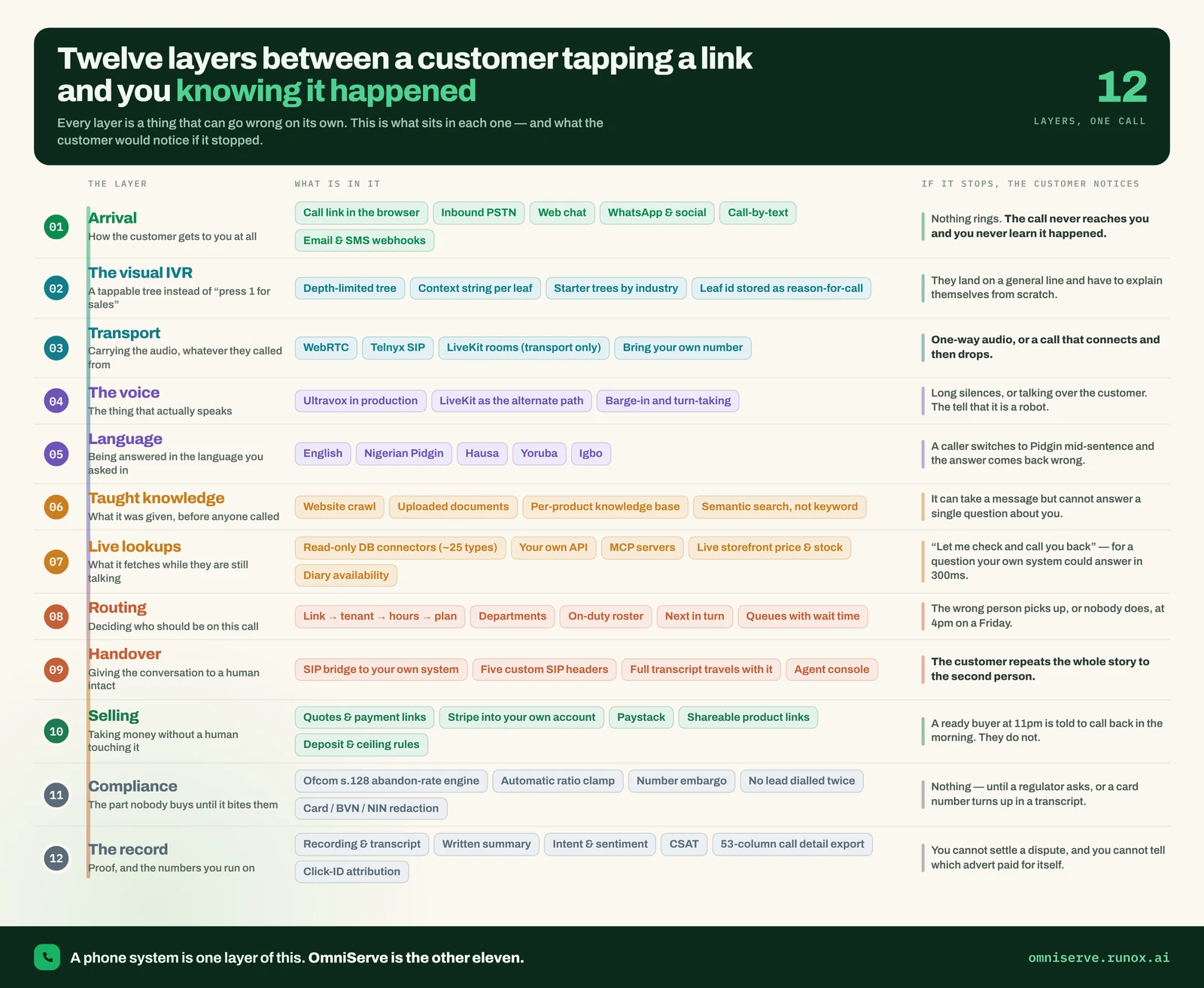 Figure 1: Twelve layers between a customer tapping a link and you knowing it happened. Read the right-hand column: each line is a failure a customer would feel.
The right-hand column is the useful one. “Nothing rings.” “They have to explain themselves from scratch.” “Long silences, or talking over the customer.” These are not abstract engineering faults. They are the complaints you already hear, traced back to the layer that caused them.
The footer makes the point bluntly: a phone system is one layer of this. It moves the call. It does not answer it, route it sensibly, remember it, or prove it happened.
Layers 1 to 3: getting the call to you at all
1. Arrival
Arrival is every door a customer can use: a call link in the browser, an ordinary inbound phone call, web chat, WhatsApp, email. If arrival fails, the customer never reaches you and, worse, you never learn they tried.
The question that matters here is not “how many channels do you support?” but “which of these are live today, and which are on the roadmap?” Vendor channel lists tend to blur the two. Ask for the status of each one in writing.
Ask any vendor: If a customer abroad taps our link or rings our number, what does it cost them, and does it connect?
2. The visual IVR
An IVR is the “press 1 for sales” menu. A visual IVR shows the same choices as buttons on screen, so the customer taps “Deliveries” rather than listening to six options and guessing. The useful detail is what happens to the choice afterwards. If the button they pressed is stored as the reason for the call, whoever picks up already knows why they are ringing.
Ask any vendor: When a customer chooses an option, where does that choice go? Does the person who answers see it?
3. Transport
Transport is the plumbing that carries the audio. In OmniServe that means WebRTC for calls made in the browser, SIP lines (including a Telnyx SIP connection and your own trunk if you bring one) for ordinary phone calls, and LiveKit rooms used purely to carry media. You will rarely think about this layer until it fails, and when it does the symptoms are distinctive: one-way audio, or a call that connects and then drops a few seconds in.
Ask any vendor: Can we keep our existing numbers and desk phones? What happens to a call if the internet connection at our end drops?
Layers 4 to 7: answering properly
4. The voice
This is the part that actually speaks. OmniServe uses Ultravox in production for spoken AI calls, with LiveKit as an alternative path. The quality test is not how pleasant the voice sounds in a demo. It is barge-in and turn-taking: whether the AI stops when the customer interrupts, and whether it leaves long, awkward silences. Those are the tells that make callers hang up.
Ask any vendor: Can I ring your demo line now and interrupt it, talk over it, and use a phrase it won’t expect?
That last test is the one we recommend on our own status page. No website can settle how a voice copes with a bad line, a strong accent or a noisy room. Only a call can.
5. Language
A customer who switches into Pidgin mid-sentence and gets a wrong answer has been failed by this layer. Language support is easy to list and hard to deliver well.
To be precise about OmniServe as at October 2026: the AI receptionist answers in English today. Nigerian Pidgin, Yoruba, Igbo and Hausa are built and in testing, not yet live. We say that plainly because language quality is exactly the kind of claim that looks fine on a poster and falls apart on a real call.
Ask any vendor: Which languages are live for customers today, and how were they tested?
6. Taught knowledge
This is what the AI was given before anyone called: your website, crawled page by page; your documents, such as price lists and policies; and a knowledge base per product. It is searched by meaning rather than keyword, so “do you deliver on Saturdays?” finds the delivery policy even if the word “Saturday” never appears in it.
If this layer is thin, the AI can take a message but cannot answer a single question about you. The honest measure is not how much it knows on day one but how quickly it learns. OmniServe keeps a log of every question the AI could not answer, so the gaps become a list you can fix.
Ask any vendor: Show me the list of questions your AI failed to answer last week.
7. Live lookups
Some answers cannot be written down in advance. “Has order 4471 shipped?” has to be looked up while the customer is still on the line. OmniServe can connect to around 25 types of database read-only, with access scoped per link, so the sales line and the support line see different slices of your data. Every query is checked before it runs: no writes, no deletes, no schema changes.
There is a distinction worth understanding before you buy. A database you connect can be queried live, mid-sentence. Third-party systems such as a CRM or helpdesk are read before the conversation starts, so the AI opens knowing the shape of the customer’s account but cannot call those APIs during a sentence. If you need a specific system answered live, ask where it sits.
Ask any vendor: Can your AI change anything in our systems? Show me how that is prevented, not just discouraged.
Layers 8 to 10: people and money
8. Routing
Routing decides who should be on this call: which department, who is on duty, who is next in turn. When routing is weak, everything lands on whoever answers fastest, and at four o’clock on a Friday the wrong person picks up, or nobody does.
OmniServe’s members, roles, departments, on-duty status and next-in-turn assignment are live. Call queues with wait times, the spoken call menu and the wallboard are built and in testing. Routing is decided per link rather than per company, so a link marked “my team” overrides the company default because somebody set it deliberately.
Ask any vendor: When two calls arrive at once and one person is on duty, what happens to the second caller?
9. Handover
Handover is the moment the AI passes the conversation to a person. Done badly, the customer repeats the whole story. Done well, the full transcript and a summary travel with the call.
One detail separates the good implementations from the rest. When OmniServe puts a call through to your own phone system, it sends custom SIP headers with the invitation: the call ID, the caller’s name and number, and the campaign that sent them. Any PBX or softphone that reads custom headers can show that on screen while the call is still ringing.
Ask any vendor: When your AI hands a call to my desk phone, what does my receptionist see before picking up?
10. Selling
A ready buyer at 11pm who is told to call back in the morning often does not. This layer lets the conversation take money without a person: quotes, payment links and deposits.
Two things matter. First, where the money goes. With OmniServe, payments go directly into your own Stripe account and never pass through us; local payment rails for West and East Africa are available on request. Second, who sets the limits. Deposit floors, discount ceilings and which products can be sold without a person are enforced by the platform before a price is ever quoted. They are rules, not instructions in a prompt, and the difference matters because a prompt can be argued with.
Ask any vendor: Can a determined caller talk your AI into a discount? How do you know?
Layers 11 and 12: the parts nobody buys until they need them
11. Compliance
This is the layer that does nothing visible until a regulator asks, or a card number turns up in a transcript.
For outbound calling in the UK, the reference point is Ofcom’s statement of policy on persistent misuse under the Communications Act 2003. It dates from 2010 and includes a limit on abandoned calls of three per cent of live calls per campaign over a 24-hour period [1]. OmniServe’s outbound dialler is built to that policy: the abandon rate is tracked per campaign, the dial ratio is clamped automatically, and a number that reached nobody is embargoed for 72 hours. The dialler itself is in testing as at October 2026, and predictive dialling is deliberately switched off until the information message and answering-machine detection it needs are in place.
On the inbound side, OmniServe strips card numbers, PIN and one-time codes, BVN, NIN, IBAN and sort-code patterns from summaries and reports. You remain responsible for your lawful basis to call and for screening against preference registers.
Ask any vendor: Is your compliance enforced before the call is made, or reported on afterwards?
12. The record
The record is the proof: the recording and transcript, a written summary, intent and sentiment, satisfaction scores, and the marketing detail of where the customer came from. OmniServe exports a 53-column call detail record keyed to one call ID, including billable seconds alongside duration so a bill can be checked rather than believed, and click IDs from Google, Microsoft and Meta so bookings can be traced to the advert that produced them.
Two settings to know: call recording is off unless you switch it on (it is a paid add-on), and callers hear that the call is recorded before anything else when it is.
Ask any vendor: Can I export every field you hold on a call, and does it include what the AI could not answer?
The same journey, in eight steps
The twelve layers are the engineering view. The figure below is the customer’s view of the same journey: eight stages, from arrival to evidence months later.
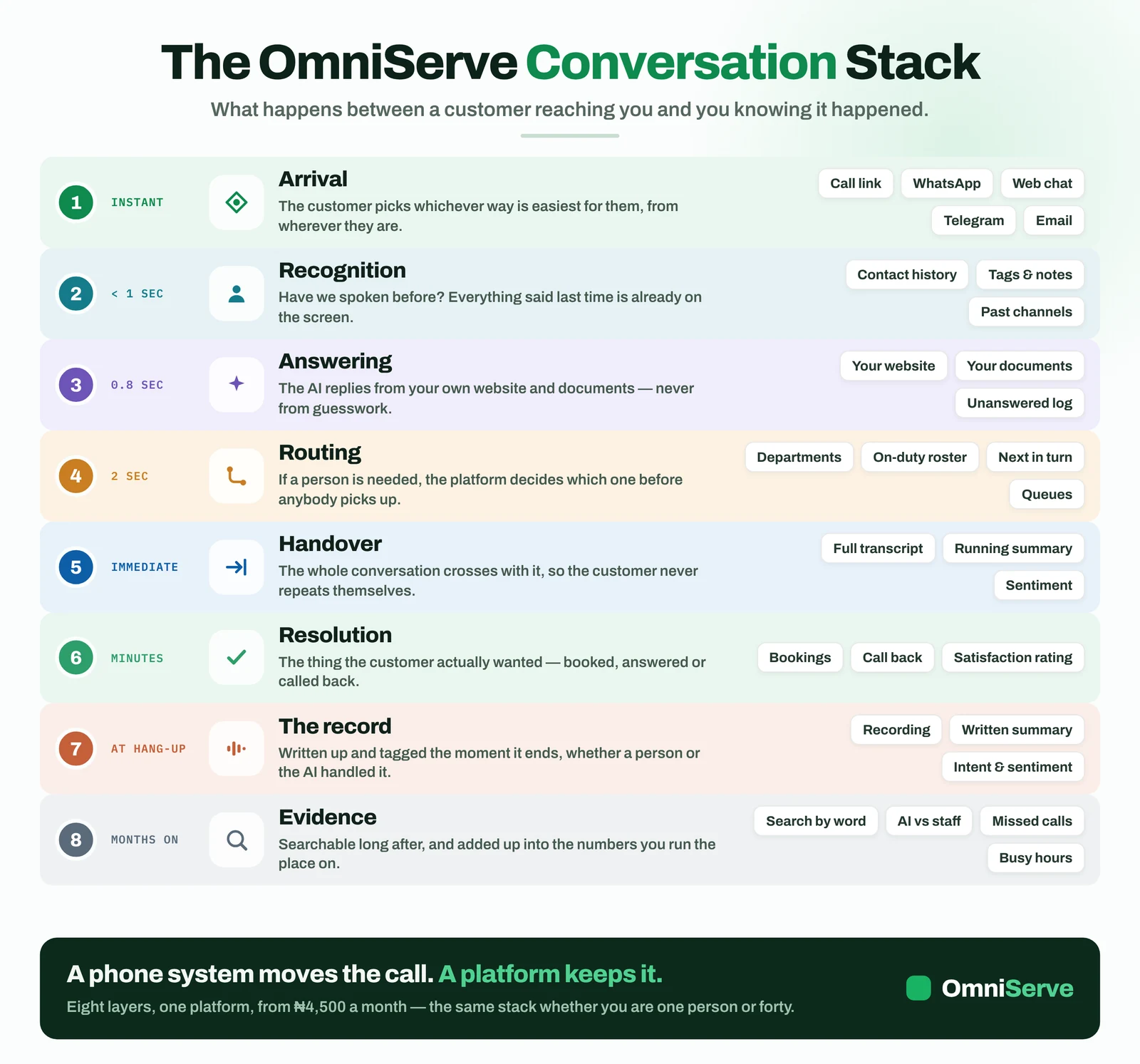 Figure 2: The conversation stack. The left column says when each stage happens; notice that the last two happen after the customer has gone.
What to notice is the second stage, recognition: “Have we spoken before?” Contact history across channels, tags and notes are live in OmniServe, so a returning customer is not treated as a stranger. And notice the last stage. Evidence is “months on”: the ability to search by word, compare AI against staff, and count missed calls and busy hours. A phone system keeps none of that.
The timings shown on the left of the figure (“< 1 sec”, “0.8 sec”) are design targets, not measurements we publish. Treat them as the order of magnitude to expect, and test them yourself.
How the layers fit together
The architecture view below shows the same components as a cycle around one platform, with the properties that should hold on every channel listed on the right.
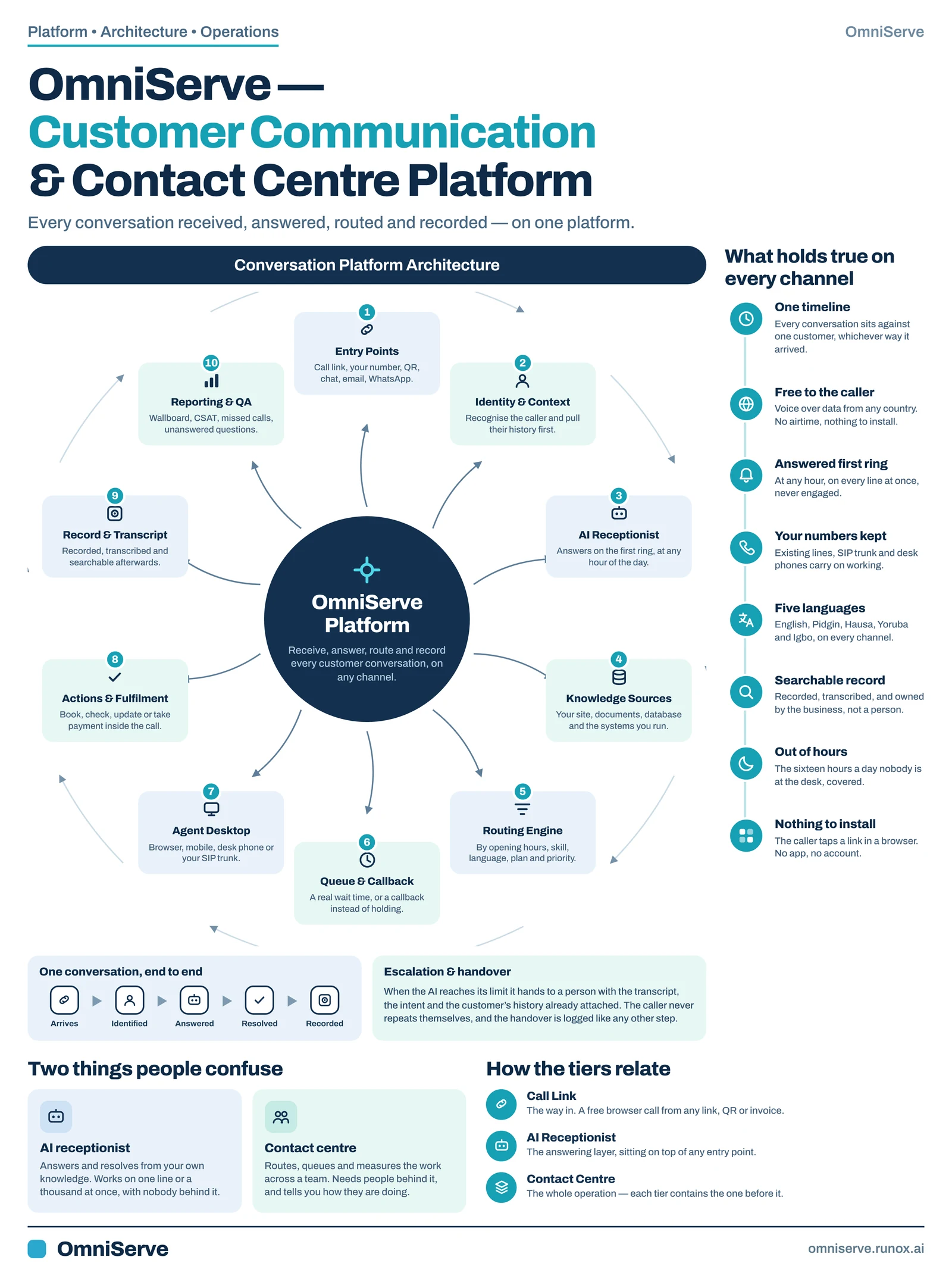 Figure 3: The platform architecture. The bottom-right panel is the key: each tier contains the one before it.
The most useful part of this figure for a buyer is the bottom section. “Two things people confuse” separates an AI receptionist, which answers and resolves from your own knowledge, from a contact centre, which routes, queues and measures work across a team. Many products sell one and imply the other.
“How the tiers relate” sets out the ladder. Call Link is the way in: a free browser call from any link, QR code or invoice. The AI receptionist is the answering layer on top of any entry point. The contact centre is the whole operation. Each tier contains the one before it, so you can start with the first and grow without changing systems.
One caution on the right-hand list: “five languages” and “a real wait time, or a callback” describe features that are in testing, as noted above.
The one-page summary
If you only want one picture to pin up, it is the cheat sheet below. It condenses the platform into twelve tiles.
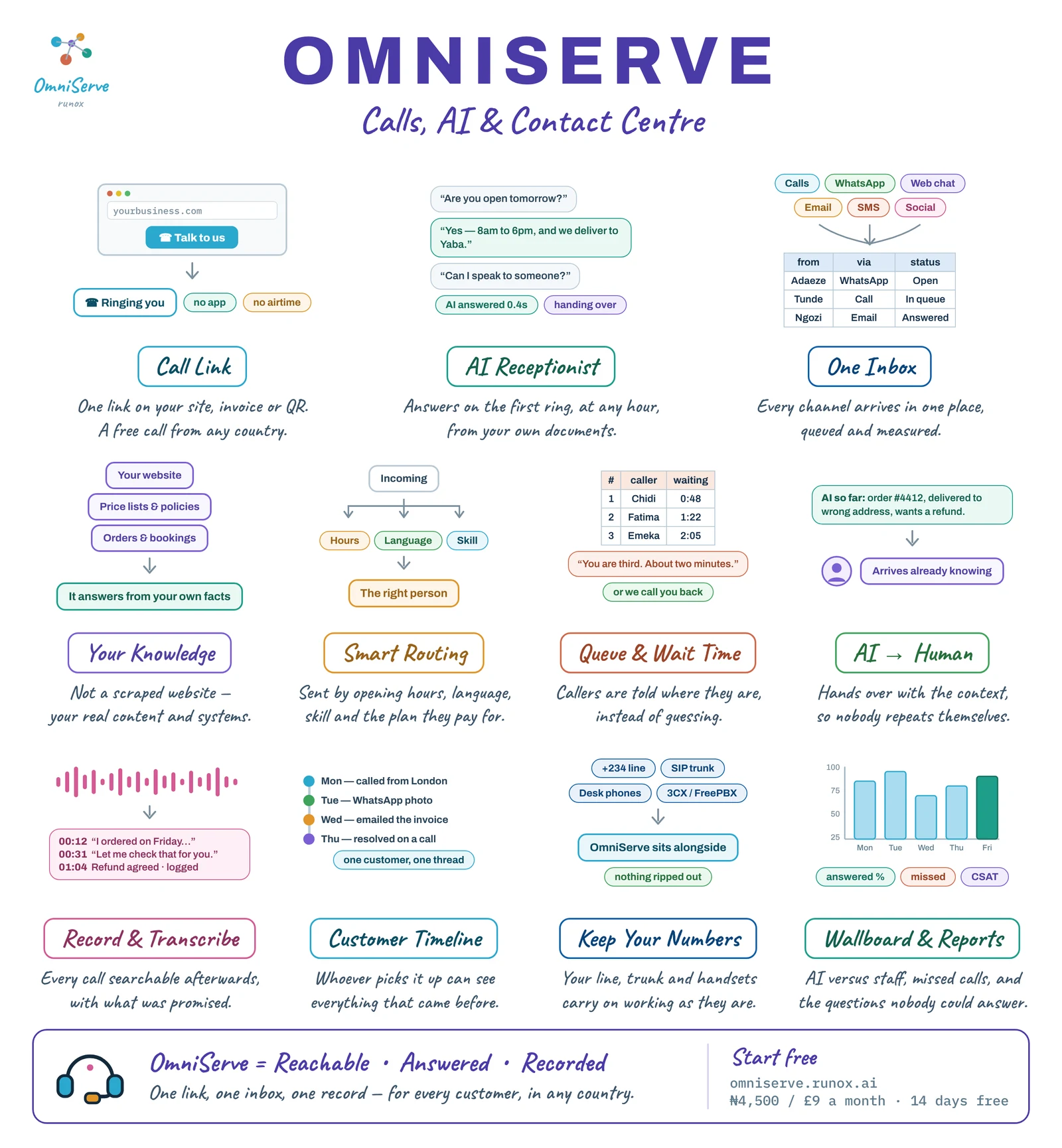 Figure 4: The cheat sheet: reachable, answered, recorded. One link, one inbox, one record.
Read it as three rows. The top row is reaching you: the call link, the AI receptionist and one inbox. The middle row is handling the conversation well: knowledge, routing, queues and the handover. The bottom row is what remains afterwards: the record, the customer timeline, your existing numbers kept in place, and reports.
The price on the sheet, ₦4,500 or £9 a month (US$9 elsewhere), is the Call Link plan, the entry point. The AI receptionist and contact centre features sit on higher plans. Queues and the wallboard are in testing.
What to do this week
You do not need to buy anything to use this framework. Here is a one-week exercise.
Day 1: test arrival. Ring your own business from a mobile, then from a number abroad if you can borrow one. Use the chat on your website. Send a WhatsApp. Write down which ones connected, how long each took and what it cost the caller.
Day 2: test after hours. Repeat the same tests at 7pm. Note which doors are simply shut.
Day 3: test knowledge. Ask your five most common customer questions through each channel. Count how many got a correct answer without a person.
Day 4: test the handover. Ask to speak to someone. Did you have to repeat yourself? Did the person know why you were calling?
Day 5: test the record. Try to find yesterday’s calls. Can you see who called, who answered, what was said and what was promised? If a customer disputed something from last month, could you settle it?
Score each layer red, amber or green. The red ones are where you are losing customers. Take that scorecard into any vendor conversation, and ask the questions in this article against each red layer.
Where OmniServe fits
OmniServe was built so that all twelve layers sit in one platform, with one record underneath. Live as at October 2026: call links that open a voice call or chat in the browser; the AI receptionist on calls and chat, taught from your website and documents, with handover rules; WhatsApp, Telegram, web chat and email in one inbox; your SIP line and desk phones; read-only database lookups; on-duty and next-in-turn assignment; recordings (as a switched-on add-on), transcripts and summaries; and reports including AI against staff and the questions the AI could not answer.
In testing: queues, the call menu and wallboard, the outbound dialler, SMS, local numbers, and the four Nigerian languages. We publish that split on our status page because you will find out anyway, and it is better you hear it from us.
The fastest way to judge it is the test we suggested under layer 4. Build a demo from your own website, ring it, interrupt it and ask it something awkward. If it holds up, the rest of the stack is worth a closer look.
Answer every customer, on every channel. See how OmniServe runs your front desk: omniserve.runox.ai
Sources
- Ofcom, “Revised statement of policy on the persistent misuse of an electronic communications network or service”, 2010. https://www.ofcom.org.uk/consultations-and-statements/category-2/persistent_misuse