One front desk, any sector: how schools, clinics, shops and churches answer every customer
· 11 min read
What an always-on front desk looks like in schools, clinics, shops, churches and more, and how to choose between a call link, an AI receptionist and a contact centre.
A school, a church, a pharmacy and a logistics firm look like four completely different businesses. Listen to their phones for a morning and they sound remarkably alike.
Somebody wants to know if you are open. Somebody wants to know where their thing is. Somebody wants to book a time. Somebody is upset and wants a person. And somewhere in the middle, a call rings out because the one person who could answer it is already on another line.
The words change by sector. The shape does not. That is useful, because it means the fix is the same shape too: a front desk that answers everyone, knows the routine answers, passes the rest to the right person and keeps a record. What changes from sector to sector is which part of that front desk does most of the work.
This article goes through what that looks like across a range of sectors, how to choose the right starting point for your own organisation, and a 30-minute plan to see it working on your own content.
What every front desk has to do
Before the sectors, the common ground. The figure below sets out six jobs any front desk does, whatever the sign above the door says.
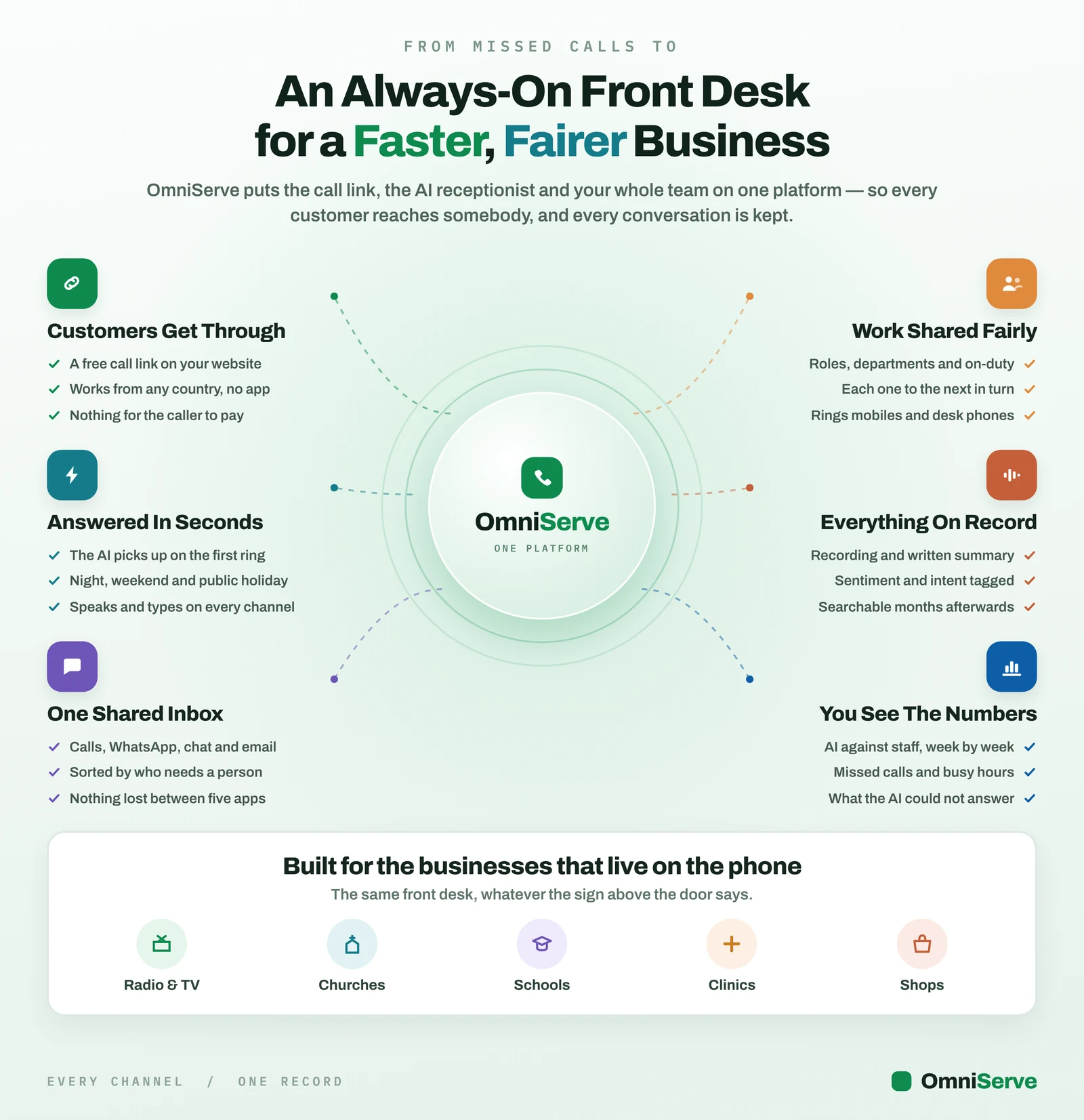 Figure 1: Six jobs around one platform. The left side is about the customer reaching you; the right side is about how your team works and what you can prove afterwards.
Read the left side first. Customers get through is about removing cost and friction: a free call link on your website that works from any country without an app. Answered in seconds is the AI picking up on the first ring, including nights, weekends and public holidays. One shared inbox brings calls, WhatsApp, chat and email into one list, sorted by who needs a person.
Then the right side. Work shared fairly means roles, departments and on-duty status, with each new conversation going to the next person in turn rather than whoever answers fastest. Everything on record means a recording (if you switch it on), a written summary and the ability to search months later. You see the numbers means AI against staff week by week, missed calls and busy hours, and the questions the AI could not answer.
The strip at the bottom is the point of this article: “The same front desk, whatever the sign above the door says.”
Three tiers, and how to choose
OmniServe is built as three tiers, each containing the one before it.
- Call Link. A link or QR code people tap to call you free from their browser. Your phone rings and you answer. No AI required.
- AI receptionist. The AI answers on that link, and on chat and messaging, from your own website and documents, and hands over to a person when it should.
- Contact centre. Routing, queues and measurement across a team. The routing and team features are live; queues, the call menu and the wallboard are in testing as at October 2026.
A simple way to choose:
- If you have one or two people and the problem is mainly reachability (callers abroad, callers who will not spend airtime, desktop visitors who cannot click a phone number), start with Call Link.
- If the problem is volume of routine questions or out-of-hours demand, add the AI receptionist.
- If the problem is a team that cannot see who is waiting, look at the contact centre features, bearing in mind which are live and which are in testing.
Sector by sector
The grid below runs through thirty sectors with a one-line example for each, and the tier that example leans on. It is illustrative of what the platform is built to handle; the organisations named are sector types, not customers.
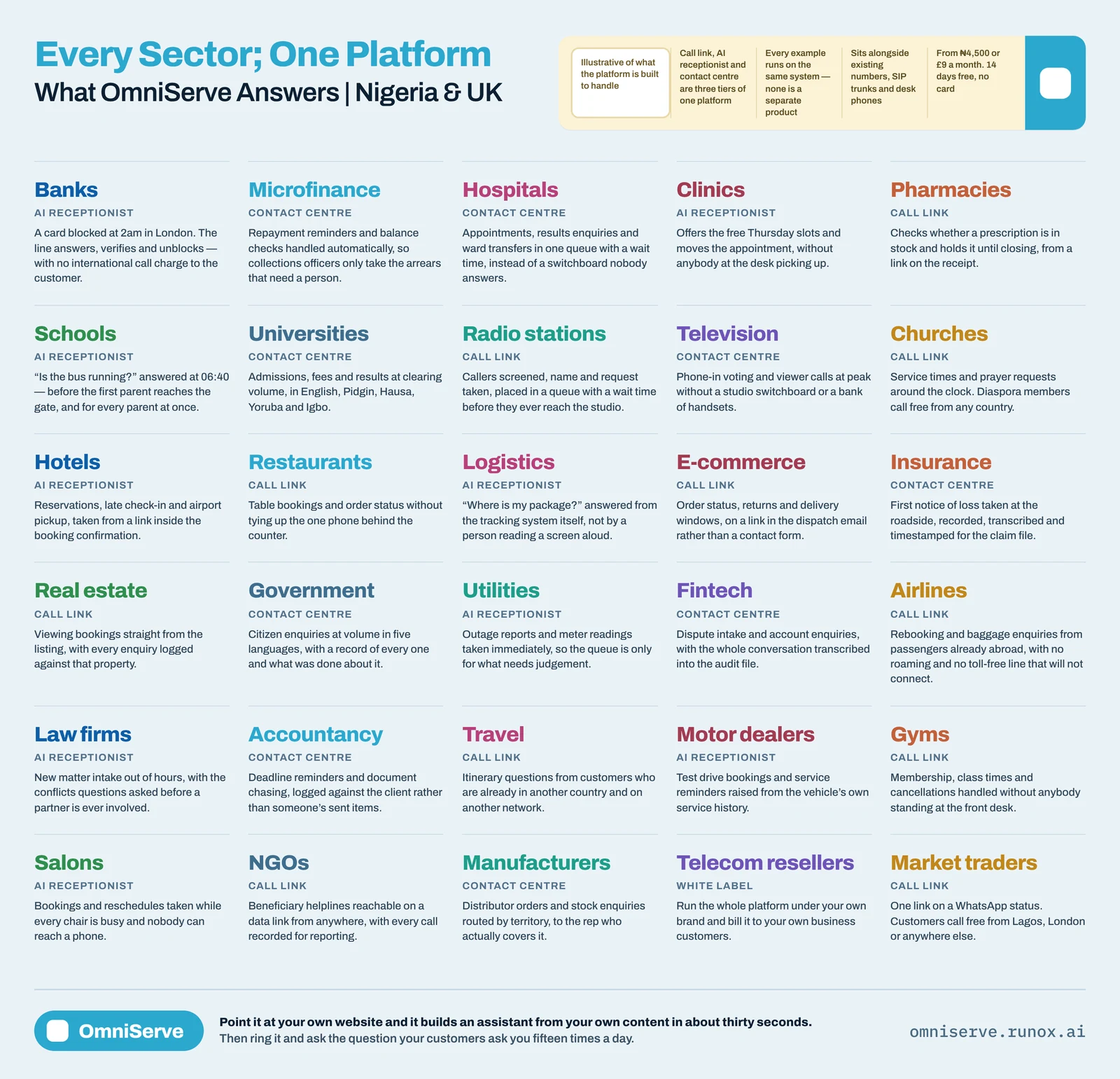 Figure 2: Thirty sectors, three tiers. The tag under each name shows which tier does most of the work in that example.
Notice the tags rather than the names. Pharmacies, restaurants, churches and market traders are tagged call link: their problem is mostly being reachable. Schools, clinics, hotels and salons are tagged AI receptionist: the same routine questions, many times a day. Hospitals, universities and insurers are tagged contact centre: volume across a team. Telecom resellers are tagged white label, running the platform under their own brand for their own business customers.
Here is how that plays out in the sectors we hear from most.
Schools and universities
The routine questions are admissions, fees, term dates and transport. They peak at predictable times: the start of term, results day, the first cold morning when parents want to know if the bus is running. A school’s office cannot staff for those peaks, and the questions are the same every time.
That is a good fit for an AI receptionist taught from the school’s own website and fee schedule, with anything about a specific child handed to the office. Universities often want a separate call link per faculty or office, so an admissions question never lands in the accounts office. School and university App Links are live.
Churches
Service times, directions, prayer requests and giving questions, around the clock. Many churches also have members abroad who will not ring an international number. A call link on the website or WhatsApp status lets them call free over data, and each ministry can have its own line. Church App Links are live.
Radio and television
Phone-ins are a peak-volume problem: hundreds of callers in a few minutes, most of whom never get through. A station call link has no line limit in the way a single studio number does, and the AI can screen callers, taking name and topic before the producer sees them. Radio App Links and the radio studio app are live.
Clinics, hospitals and pharmacies
Appointments, opening hours, directions and “is my prescription ready?”. The key rule here is that urgent callers go straight to a person, and that rule should be written down before the AI goes live. Booking pages, appointment types and reminders are live, and the AI can book free slots on calls, chats and email. App Links designed specifically for hospitals are in testing.
Shops, e-commerce and market traders
Stock, prices, delivery and order status. Some of those answers can be taught once (“do you deliver to Ikeja?”); others have to be looked up live (“is the 2.5kVA in stock?”). OmniServe can read a connected database read-only during the conversation for the second kind. App Links tailored for shops and markets are in testing; the call link and AI receptionist work for any shop today.
Hotels and salons
Reservations, late check-in, airport pick-up, bookings and reschedules, often when every member of staff is with a guest or a client. The AI takes the booking or the message; the person on duty handles the exception. App Links tailored for hotels and salons are in testing.
Logistics
“Where is my package?” is the single most common question, and the worst one to have a person read off a screen. Answered from the tracking system itself, through a read-only lookup, it stops consuming staff time.
Law firms and accountants
New-matter intake out of hours, with the screening questions asked before a partner is involved, and deadline or document reminders logged against the client rather than in someone’s sent items. The record matters as much as the answer.
Telecom resellers
The odd one out. Rather than using a front desk, they sell one: running the platform under their own brand and billing their own business customers. We publish a separate page on white-label use for internet telephony providers.
A thirty-minute plan to see it on your own business
The advert below sums up the offer: one front desk for any business, from ₦4,500 a month.
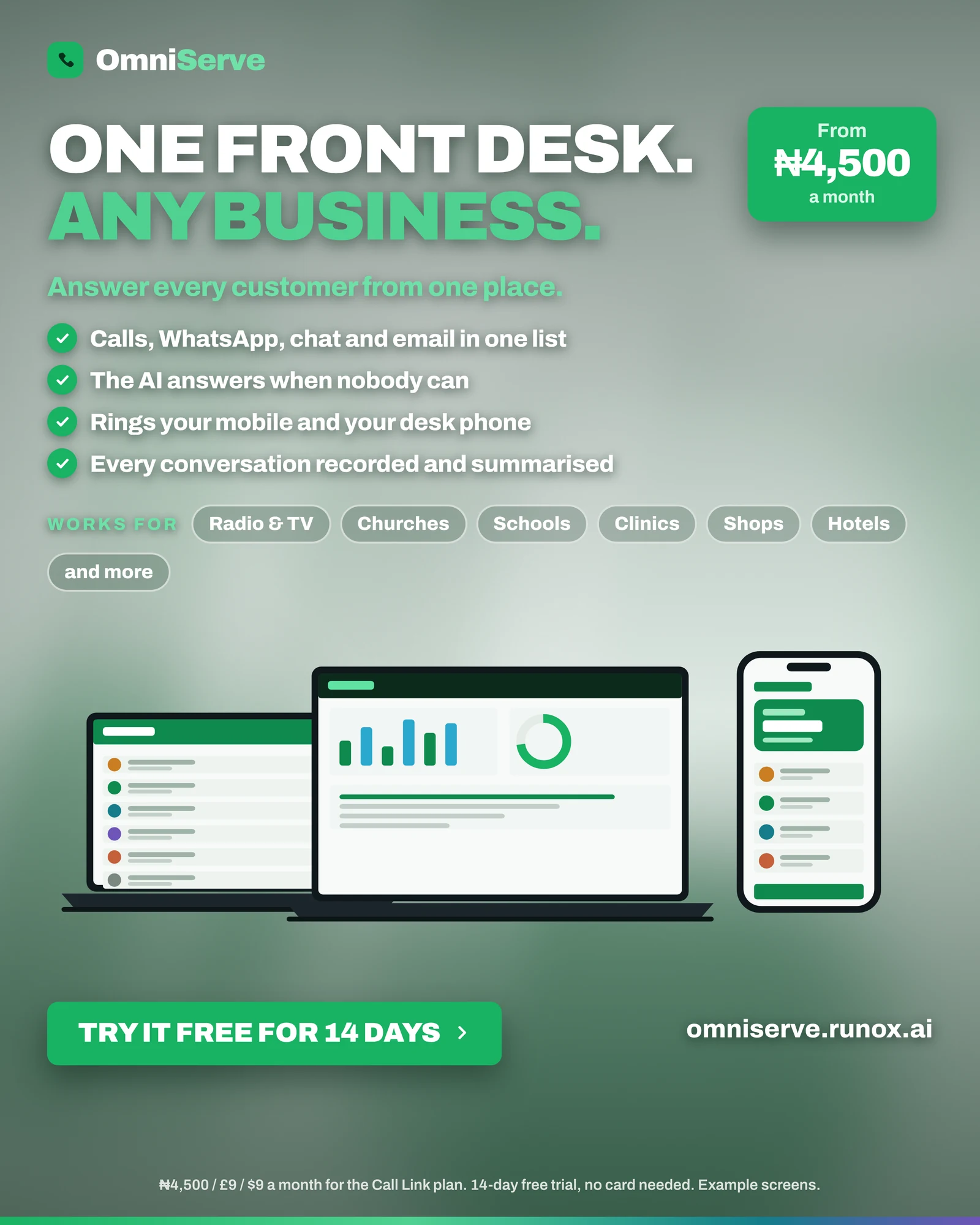 Figure 3: The entry offer. Read the small print at the bottom: the price is for the Call Link plan, and the screens are examples.
The small print is the part to read. ₦4,500, £9 or $9 a month is the Call Link plan, the entry tier, priced in Naira in Nigeria, Pounds in the UK and Dollars elsewhere. The AI receptionist and team features sit on higher plans. There is a 14-day free trial with no card needed. The screens are labelled as examples.
You do not need to commit to anything to see whether it suits you. Here is a plan that fits into half an hour.
Minutes 0 to 5: build a demo from your website. Paste your website address into the demo builder on the OmniServe site. It reads your pages and, in about 30 seconds, gives you an AI you can chat to, talk to by voice, or get a call link for. No sign-up.
Minutes 5 to 15: ask it your top ten questions. Write down the ten questions your front desk answers most. Ask each one. Mark each answer right, wrong or “didn’t know”.
Minutes 15 to 20: ring it and be awkward. Interrupt it. Talk over it. Ask for a person. Ask something it should not answer. This is the test that tells you most about any voice AI.
Minutes 20 to 25: list the gaps. Every “wrong” or “didn’t know” is usually a missing page or document: a fee schedule, a delivery policy, a price list. Note what you would need to upload.
Minutes 25 to 30: write your handover rules. Three to five lines on when the AI must pass to a person: urgent medical questions, complaints, anything about money above a set amount, anything about a specific child or patient.
If the result is promising, setting up properly takes about an afternoon for a single business: choose your trade, upload your documents, connect your calendar and publish a link.
A learning path for whoever runs it
Whoever runs your front desk will meet the same handful of problems in roughly the same order. The OmniServe Academy course list below sets them out as four tracks.
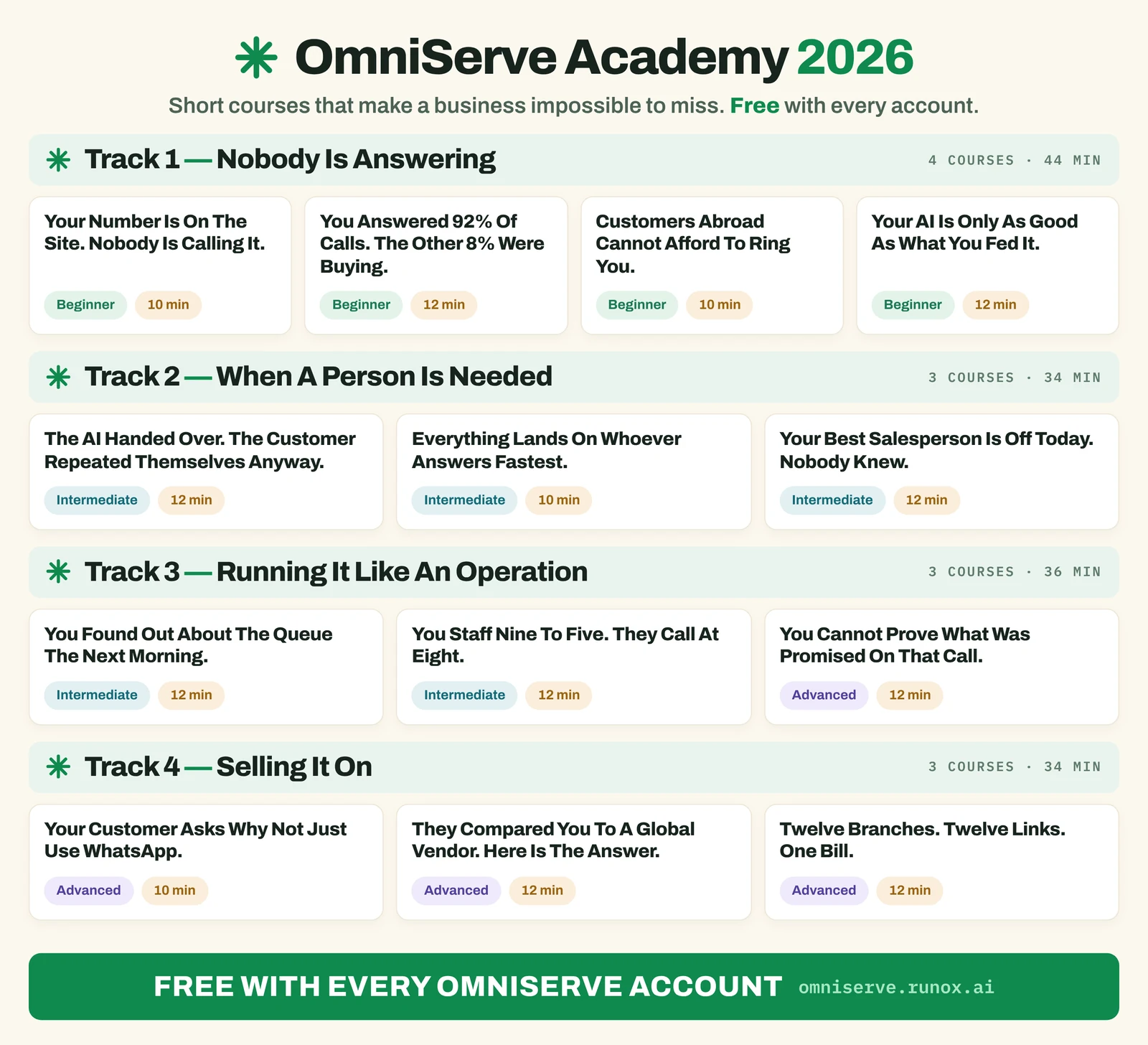 Figure 4: Four tracks, from “nobody is answering” to running a full operation. The course titles double as a list of the problems you will hit.
Even if you never open a course, the titles work as a self-diagnosis. Track 1 is reachability: “Your number is on the site. Nobody is calling it.” and “Your AI is only as good as what you fed it.” Track 2 is the human side: “The AI handed over. The customer repeated themselves anyway.” Track 3 is operations: “You staff nine to five. They call at eight.” and “You cannot prove what was promised on that call.” Track 4 is for those reselling the platform.
Work out which track describes your problem today. Most small organisations are in Track 1, and should resist the temptation to jump to Track 3 before the basics work.
The first module in the course list is a quick start for the call link itself.
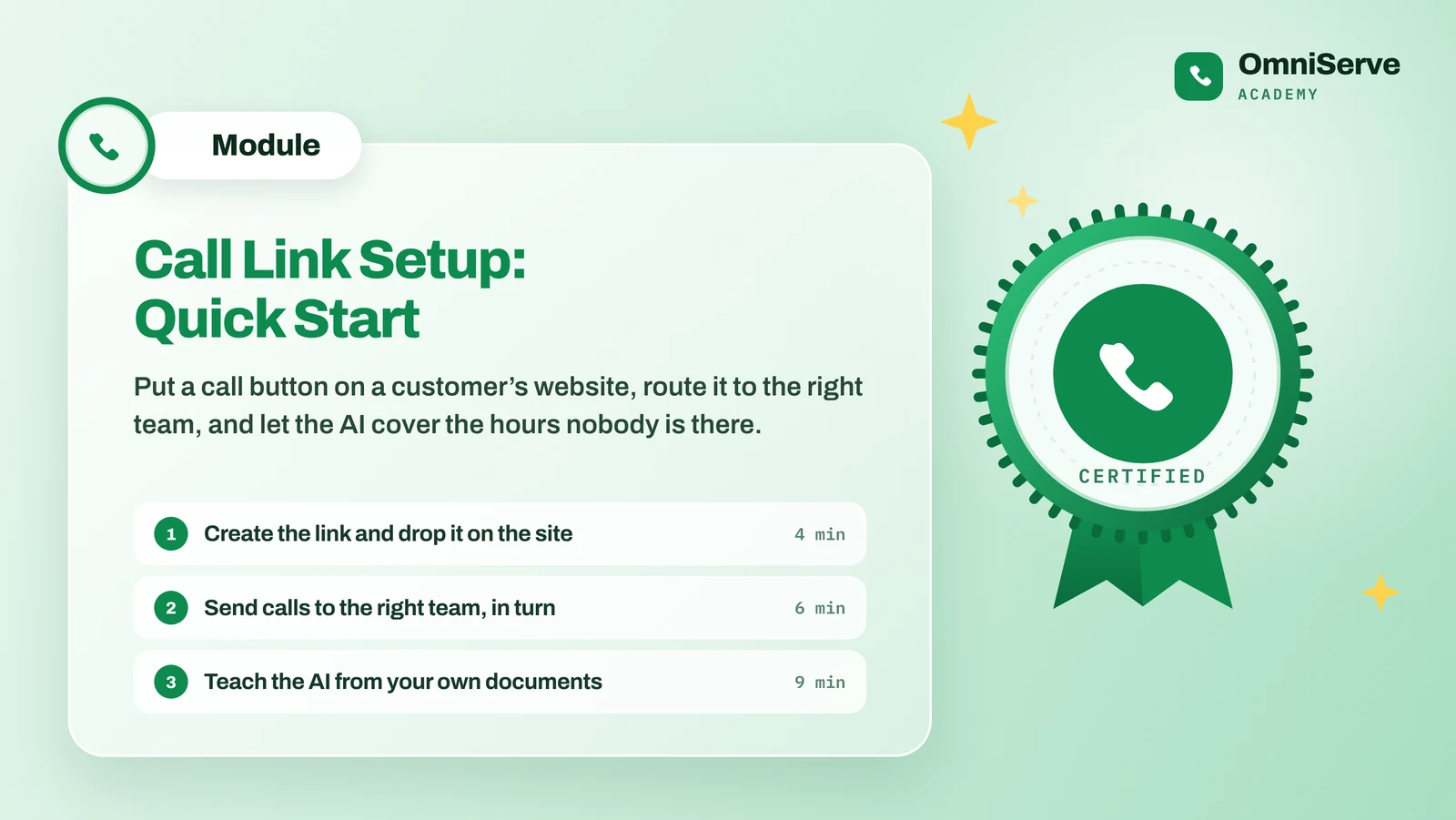 Figure 5: The quick-start module. Three steps that match the order we recommend for any new set-up.
The three steps are the right order for anyone, course or no course. First, get the link on your site so customers can reach you. Second, decide who answers, and in what order, so calls go to the right team in turn. Third, teach the AI from your own documents, so it can cover the hours nobody is there.
Handover rules by sector: worked examples
The handover rules are where sectors genuinely differ, so here are starting points to adapt. Each is a short list the AI follows before it passes a conversation to a person.
- School: anything about a named child’s welfare, attendance or behaviour; any complaint; any request to change fees or payment plans.
- Clinic or pharmacy: any mention of chest pain, breathing difficulty, bleeding or a reaction to medication goes straight to a person; anything that sounds like a request for medical advice rather than an appointment.
- Shop: refunds above a set amount; damaged or missing deliveries; trade or bulk enquiries worth a salesperson’s time.
- Church: pastoral requests and bereavements; anything a caller marks as confidential.
- Law firm: any new matter after the screening questions are answered; anything involving a court date or deadline.
Write yours in plain language, and test each one by ringing the AI and saying the trigger phrase. If it does not hand over, the rule is not working yet.
What to do this week
- Listen to your front desk for one morning. Tally the questions by type. Most organisations find that a handful of questions make up most of the calls.
- Pick your tier. Reachability problem: call link. Repetitive questions or out-of-hours demand: AI receptionist. Team visibility: contact centre features.
- Run the thirty-minute plan above on your own website.
- Write your handover rules and share them with the people who will receive the handovers.
- Decide what you will measure. Missed calls, after-hours calls, and questions the AI could not answer are the three that tell you most in the first month.
Where OmniServe fits
OmniServe is one platform for all of the above, whatever your sector. Live as at October 2026: call links and QR codes that open a free browser call or chat; the AI receptionist on calls and chat, taught from your website and documents, answering in English, with handover rules; WhatsApp, Telegram, web chat and email in one inbox; roles, departments, on-duty and next-in-turn assignment; your SIP line and desk phones; booking pages and calendar sync; recordings (as an add-on), transcripts and summaries; and reports on AI against staff, missed and after-hours calls, and unanswered questions. Radio, church, school and university App Links are live.
In testing: queues and the wallboard, SMS, local phone numbers, Nigerian Pidgin, Yoruba, Igbo and Hausa, and App Links for hospitals, salons, hotels, markets and shops.
The quickest way to judge it is to build a demo from your own website and ring it.
Answer every customer, on every channel. See how OmniServe runs your front desk: omniserve.runox.ai
Sources
No external statistics or regulations are cited in this article. Product details are from OmniServe’s published website and status page, as at October 2026.