A general AI chatbot vs an AI receptionist: same model, different job
· 10 min read
The difference is not the AI model. It is what the AI knows about you, and what happens when it does not know. A buyer's guide for owners.
In February 2024 a Canadian tribunal ordered Air Canada to compensate a passenger after the chatbot on its website gave him wrong information about bereavement fares. The chatbot said he could apply for the discount after travelling. The airline’s actual policy said otherwise. Air Canada argued that it could not be held liable for information provided by its chatbot. The tribunal member described that argument as “remarkable”, found that the airline had not taken reasonable care to ensure its chatbot was accurate, and ordered it to pay [1].
The sums involved were small, and the decision came from a small-claims tribunal rather than a senior court. The lesson is still worth remembering. If something on your website or your phone line talks to your customers, they will treat what it says as coming from you.
That is why the choice between a general AI chatbot and an AI receptionist matters to a business owner. Underneath, they may run on the same kind of AI model. What separates them is what the AI knows, what it does when it does not know, and what happens after the conversation ends. This article explains those differences in plain terms and ends with a set of questions you can put to any supplier before you let an AI speak for your business.
Same model, different idea of what it is for
Most people now have some experience of a general AI chatbot: a box where you type a question and get a fluent answer back. It is natural to assume that putting “one of those” on your website is the same as having an AI receptionist. It is not.
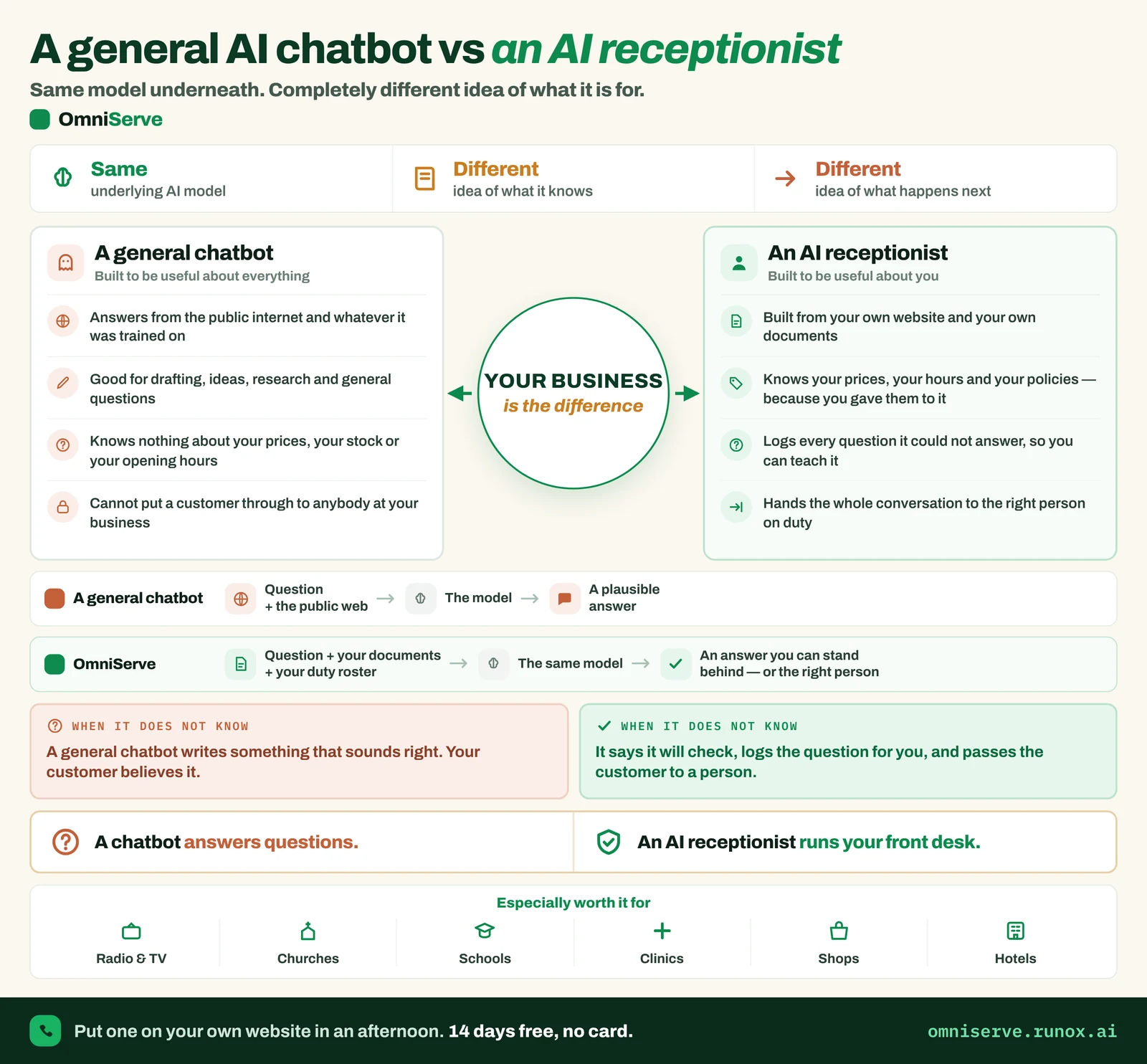 Figure 1: A general AI chatbot vs an AI receptionist. The top strip is the summary: same model, different knowledge, different next step.
Read the strip across the top of Figure 1 first. It makes three points:
- Same underlying AI model. The engine can be the same kind of technology.
- Different idea of what it knows. One draws on the public internet and its training; the other is built from your own material.
- Different idea of what happens next. One ends with an answer; the other ends with an answer you can stand behind, or with the right person.
The two panels below the strip spell this out. A general chatbot is “built to be useful about everything”. It is good for drafting, ideas, research and general questions. It knows nothing about your prices, your stock or your opening hours, and it cannot put a customer through to anybody at your business. An AI receptionist is “built to be useful about you”. It works from your website and your documents, knows your prices, hours and policies because you gave them to it, logs every question it could not answer, and hands the conversation to the right person on duty.
The two flow lines in the middle of the figure are the clearest way to see the difference. The chatbot’s line runs from “question plus the public web” to “a plausible answer”. The receptionist’s line runs from “question plus your documents plus your duty roster” to “an answer you can stand behind, or the right person”.
The word “plausible” is the important one. A general chatbot is designed to produce fluent text. Fluent and correct are not the same thing, and a customer cannot tell the difference.
When it does not know
Every AI system will meet questions it cannot answer. What matters is what it does next. The two boxes in the lower half of Figure 1 put it in one sentence each:
- A general chatbot “writes something that sounds right. Your customer believes it.”
- An AI receptionist “says it will check, logs the question for you, and passes the customer to a person.”
That is the Air Canada problem in miniature. The difficulty was not that the chatbot lacked an answer. It produced a confident answer that did not match the airline’s own policy.
For a business owner, the safe behaviour for an unknown question has three parts:
- Admit it. The AI tells the customer it does not have that information.
- Pass it on. The customer is offered a person, a call back or a booking, rather than being left at a dead end.
- Record it. The question is logged, so that you can add the missing information and the gap closes.
The third part is the one most people overlook. A log of unanswered questions is one of the most useful management documents a small business can have. It tells you what customers actually want to know, in their own words, and where your website and documents fall short.
What an AI receptionist is made of
If a general chatbot is one component, an AI receptionist is a small system. It helps to see the parts separately, because each one is a question you should ask a supplier.
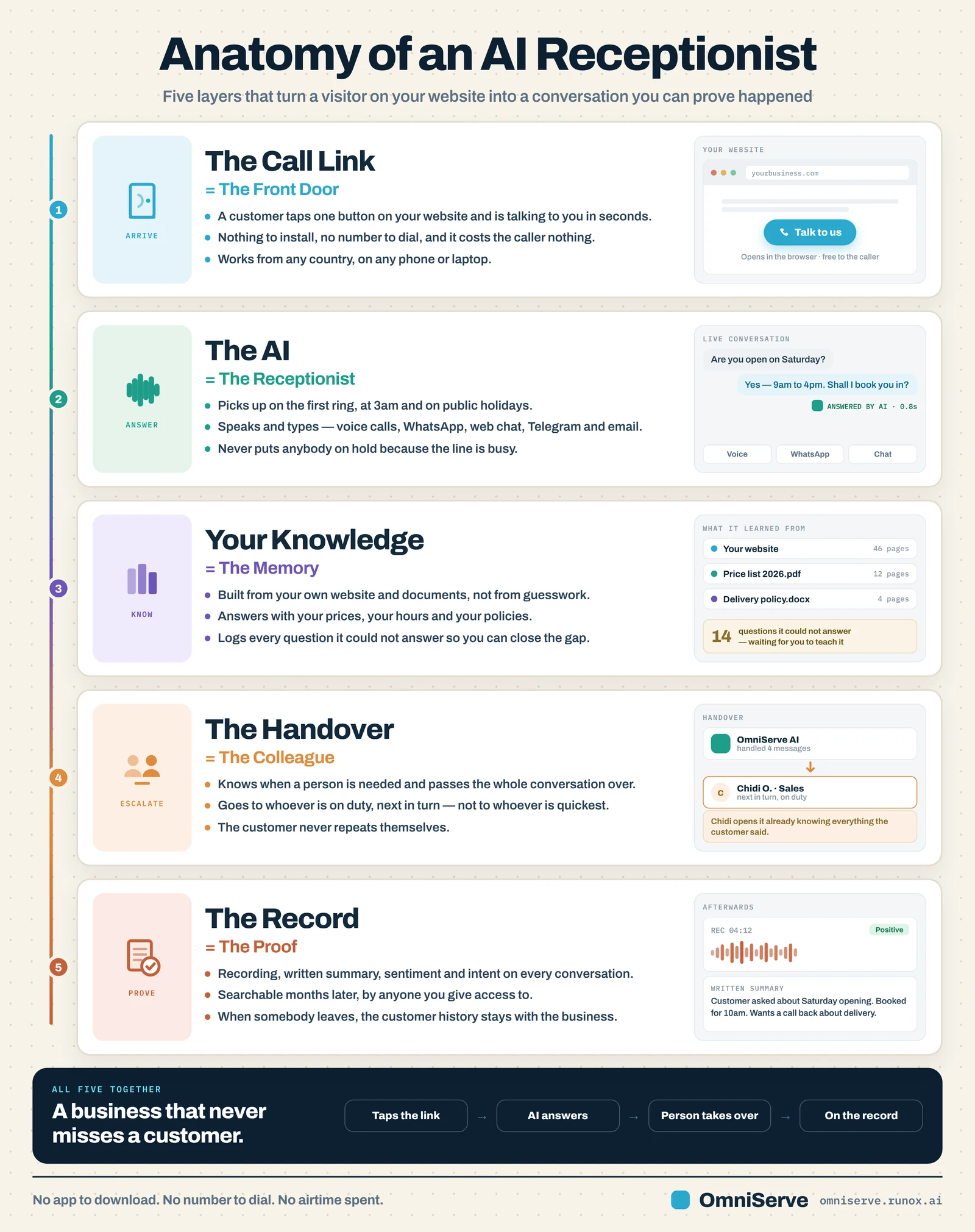 Figure 2: Anatomy of an AI receptionist. Five layers, from the moment a customer arrives to the record you keep afterwards.
Figure 2 shows five layers, each with a plain-English name:
- The call link: the front door. A customer taps a button on your website and is talking to you in seconds, with nothing to install and no number to dial.
- The AI: the receptionist. It picks up straight away, including at 3am and on public holidays, and works across voice calls and messaging channels.
- Your knowledge: the memory. It is built from your own website and documents, not from guesswork. The example panel shows a website, a price list PDF and a delivery policy document, plus a count of questions it could not answer, “waiting for you to teach it”.
- The handover: the colleague. It knows when a person is needed and passes the whole conversation over to whoever is on duty and next in turn. The note in the figure says it plainly: the colleague “opens it already knowing everything the customer said”.
- The record: the proof. A written summary and searchable history that stays with the business when somebody leaves.
A general chatbot gives you, at most, layer 2. The other four layers are what turn a clever answering machine into something you can safely put in front of customers.
Notice in particular the line in layer 4: the conversation goes to “whoever is on duty, next in turn, not to whoever is quickest”. That is a design choice about fairness inside your team and about accountability. If nobody owns a handover, nobody follows it up.
What a good answer looks like in practice
Diagrams are useful, but it helps to see one conversation from start to finish.
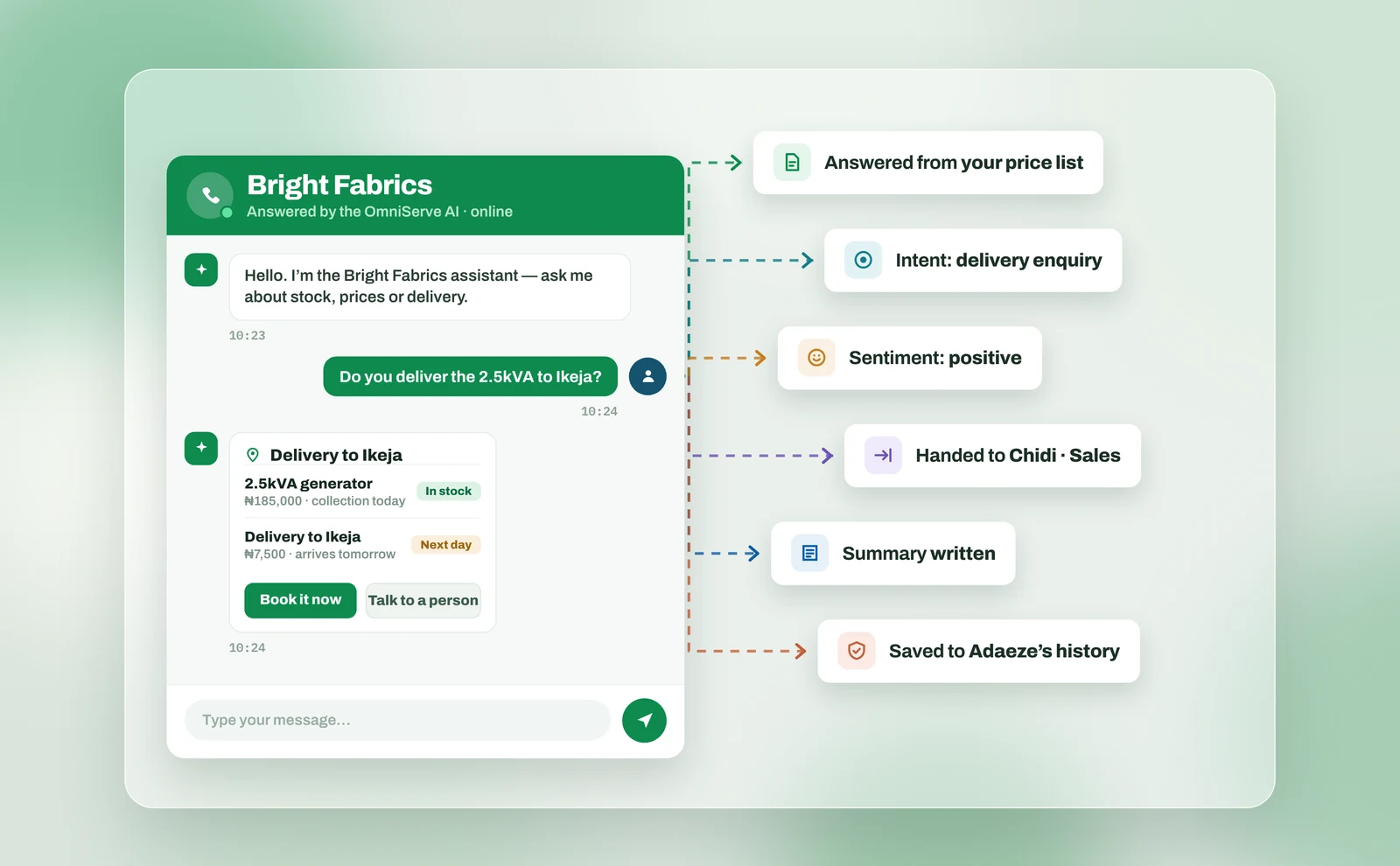 Figure 3: One answer, and the trail it leaves. Each label on the right is something that happened behind a single reply.
In Figure 3, a customer of a fictional shop called Bright Fabrics asks whether a 2.5kVA generator can be delivered to Ikeja. The reply gives the item, the price, that it is in stock, the delivery charge and that delivery is next day. It then offers two buttons: “Book it now” and “Talk to a person”.
Now look at the labels on the right. One reply has left a trail:
- Answered from your price list. The figures came from the business’s own document, not from the open web.
- Intent: delivery enquiry. The conversation is classified, so you can count how many delivery enquiries arrive each week.
- Sentiment: positive. A rough reading of how the customer feels.
- Handed to Chidi, Sales. A named person now owns the follow-up.
- Summary written. Nobody needs to read the whole chat later.
- Saved to Adaeze’s history. The next time this customer gets in touch, whoever answers can see this conversation.
Two details are easy to miss. First, the AI introduces itself at the top as “the Bright Fabrics assistant”. It does not pretend to be a member of staff. Second, the “Talk to a person” button is offered alongside the sale, not hidden behind it. A customer who wants a human can always get one.
Some answers have to be looked up
There is a limit to what can be learned in advance. Your opening hours and returns policy change rarely. Whether order 4471 has been dispatched changes by the hour.
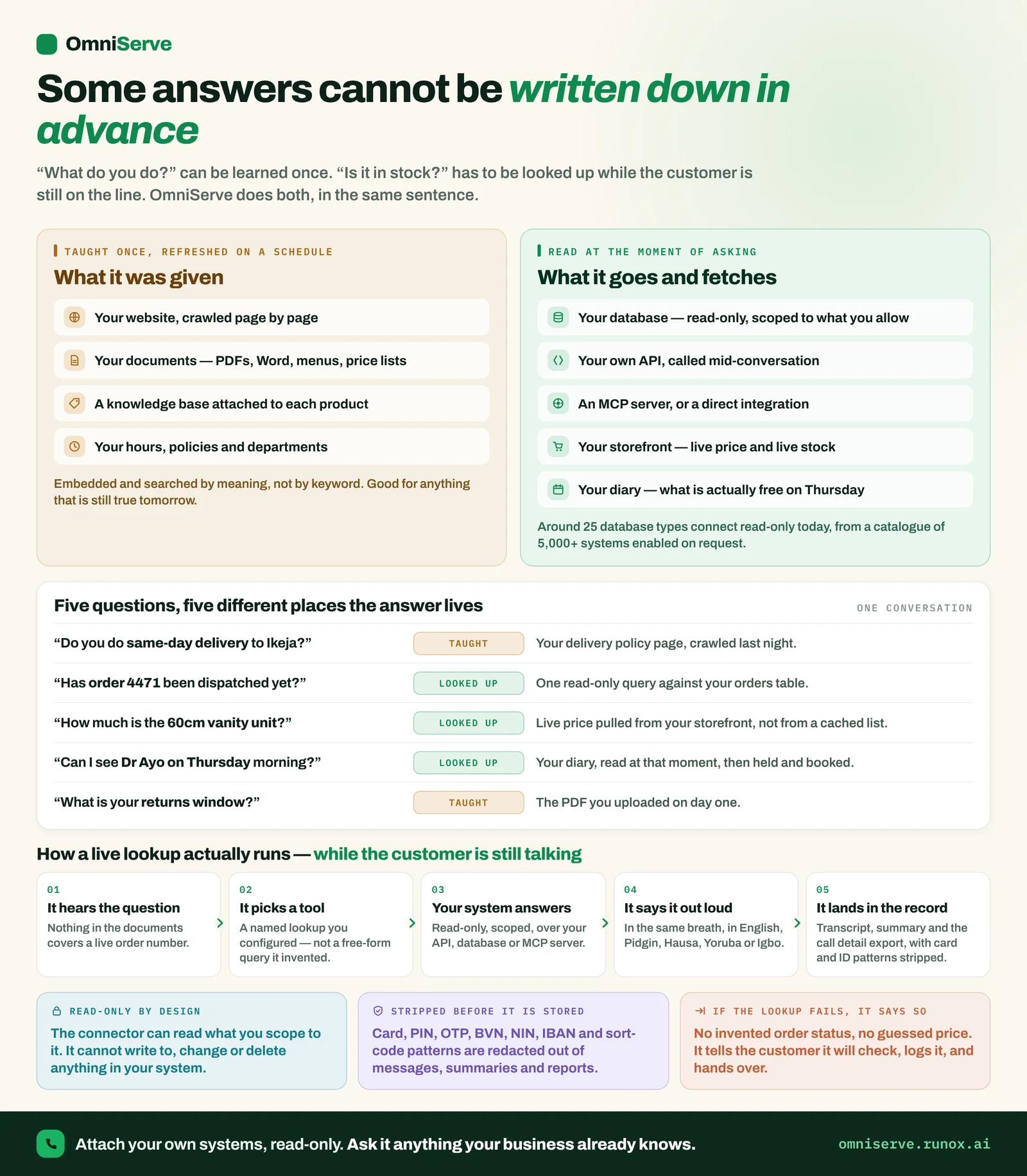 Figure 4: Some answers cannot be written down in advance. Look at the middle table: two of the five questions are “taught”, three are “looked up”.
Figure 4 splits knowledge into two kinds.
What it was given. Your website, your documents such as PDFs, Word files, menus and price lists, and your hours, policies and departments. This is good for anything that will still be true tomorrow.
What it goes and fetches. Your database, your own systems and your diary, read at the moment the customer asks.
The table in the middle of the figure is the most useful part. It takes five ordinary questions and shows where each answer lives:
| Question | Where the answer lives |
|---|---|
| “Do you do same-day delivery to Ikeja?” | Taught: your delivery policy page |
| “Has order 4471 been dispatched yet?” | Looked up: your orders records |
| “How much is the 60cm vanity unit?” | Looked up: the live price |
| “Can I see Dr Ayo on Thursday morning?” | Looked up: your diary |
| “What is your returns window?” | Taught: the PDF you uploaded |
The lesson for an owner is simple. Before you switch on any AI, sort your common questions into these two columns. The “taught” column tells you which documents need to be accurate and up to date. The “looked up” column tells you which systems the AI would need to read, and that is where the most care is needed.
Two safeguards in the lower panels of Figure 4 are worth insisting on from any supplier. The first is that connections to your systems should be read-only by design: the AI can read what you allow, but cannot change or delete anything. The second is that if a lookup fails, it says so: no invented order status and no guessed price. The customer is told it will be checked, the question is logged, and a person picks it up.
Ten questions to ask before an AI speaks for you
Whether you choose OmniServe or anything else, these questions will tell you quickly whether you are looking at a general chatbot or a receptionist:
- Where do its answers come from? Your own documents and website, or the open web and its training?
- What does it do when it does not know? Ask for a demonstration with a question it cannot answer.
- Does it say that it is an AI? Customers should never be misled about who they are talking to.
- How does it hand over to a person? To whom, on which channels, and does the person see the full conversation?
- Can a customer always reach a human? Is “talk to a person” offered, or buried?
- What can it promise? Can you set limits on prices, discounts and delivery dates?
- Is there a log of unanswered questions? How do you add the missing information?
- Can it connect to my systems read-only? And what happens if that connection fails mid-conversation?
- What record is kept? Summaries, transcripts and, if you choose, recordings. Who can search them?
- What happens to customer history when a member of staff leaves? It should stay with the business.
If a supplier cannot answer questions 2, 4 and 6 clearly, you are being offered a general chatbot with a new label.
What to do this week
- Monday: Write down the twenty questions customers ask most often. Ask your team to add to the list.
- Tuesday: Mark each one “taught” or “looked up”, as in Figure 4.
- Wednesday: For every “taught” question, check that the answer is written down somewhere accurate: your website, a price list or a policy document. Fix the gaps.
- Thursday: Write three lists: what an AI may say on its own, what it must never promise, and when it must hand over.
- Friday: Use the ten questions above to assess any AI tool you already use or are considering.
Where OmniServe fits
OmniServe is an AI receptionist in the sense described in this article, not a general chatbot.
It learns from your own website and documents. It answers calls, call-link calls, WhatsApp, Telegram and web chat, and for email it labels messages and drafts replies in your own style. Handover rules let you decide when it passes a customer to a person, and conversations go to whoever is on duty or next in turn. It can book free times into your diary, with booking pages and calendar sync for Google and Outlook. A report shows the questions the AI could not answer, so you can add what is missing.
Every call and chat gets an AI summary, and calls also carry sentiment and intent; sentiment and intent on every chat is coming. Contact history is kept across every channel. Call recording is an add-on you switch on. Database connections are read-only. The AI answers in English today, with Pidgin, Yoruba, Igbo and Hausa in testing as at October 2026.
There is a 14-day free trial with no card needed. The fairest test is the one from the checklist: give it your documents, ask it a question it cannot answer, and see what it does.
Answer every customer, on every channel. See how OmniServe runs your front desk: omniserve.runox.ai
Sources
- Civil Resolution Tribunal of British Columbia, Moffatt v. Air Canada, 2024 BCCRT 149, 14 February 2024. https://decisions.civilresolutionbc.ca/crt/crtd/en/525448/1/document.do