One inbox for calls, WhatsApp, chat and email: what changes when it's all in one place
· 11 min read
WhatsApp on one phone, email in another tab, missed calls on a list by the till. What one shared inbox actually changes, and how to move to one.
Walk into most small businesses and ask where customer messages arrive. The answer usually takes a while. WhatsApp is on the manager’s phone, and also on two staff members’ personal phones. Email goes to a shared inbox that three people can open and nobody owns. The website chat sends a notification to an address someone set up years ago. Calls ring the office line, and missed ones are written on a list by the till, when someone remembers.
None of this was designed. It grew, one channel at a time, as customers started using each new way of reaching the business. Each channel on its own works well enough. The trouble is the gaps between them: the message nobody saw because it arrived on the phone of the person who was off that day, the customer who rang, then sent a WhatsApp, then emailed, and was treated as three different people.
This article is about closing those gaps. It explains what a single shared inbox changes in practice, what to look for in one, what it does not fix on its own, and how to move to one without disrupting the business. It ends with a list for this week.
Instead of all of these
The figure below shows the starting point for most businesses, and the alternative.
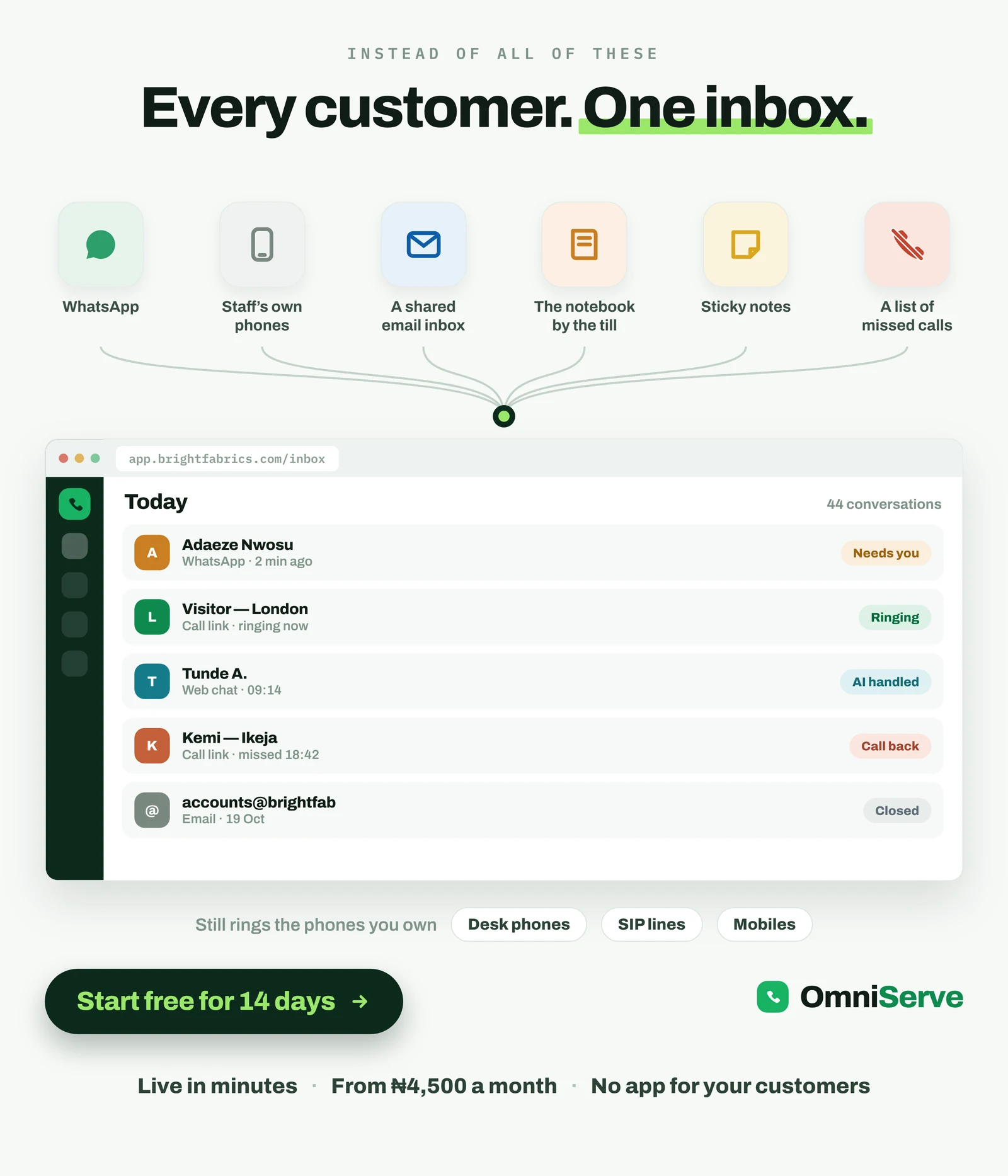 Figure 1: Six places customer contact lives today, and one inbox instead. Notice that two of the six are not software at all: a notebook and sticky notes.
The top row is the honest picture. Two of the six “systems” are paper. One is a list of missed calls, which means the record of people you failed to answer is the one most likely to be lost. And “staff’s own phones” means the conversation belongs to the employee, not the business.
Below, the same contacts sit in one list, and each row carries a status. That status is the part that matters. “Needs you” means a person must act. “AI handled” means it was dealt with and can be left. “Call back” means someone tried to reach you and did not get through. “Closed” means done. A list of messages tells you what arrived. A list with statuses tells you what to do next.
The row near the bottom is important for anyone worried about disruption: the inbox still rings the phones you already have, whether desk phones, SIP lines or mobiles. Nothing has to be ripped out.
The screen’s figures (“44 conversations”) are an example.
Not five different apps
The second figure puts the same idea as a single sentence: answer your customers, not five different apps.
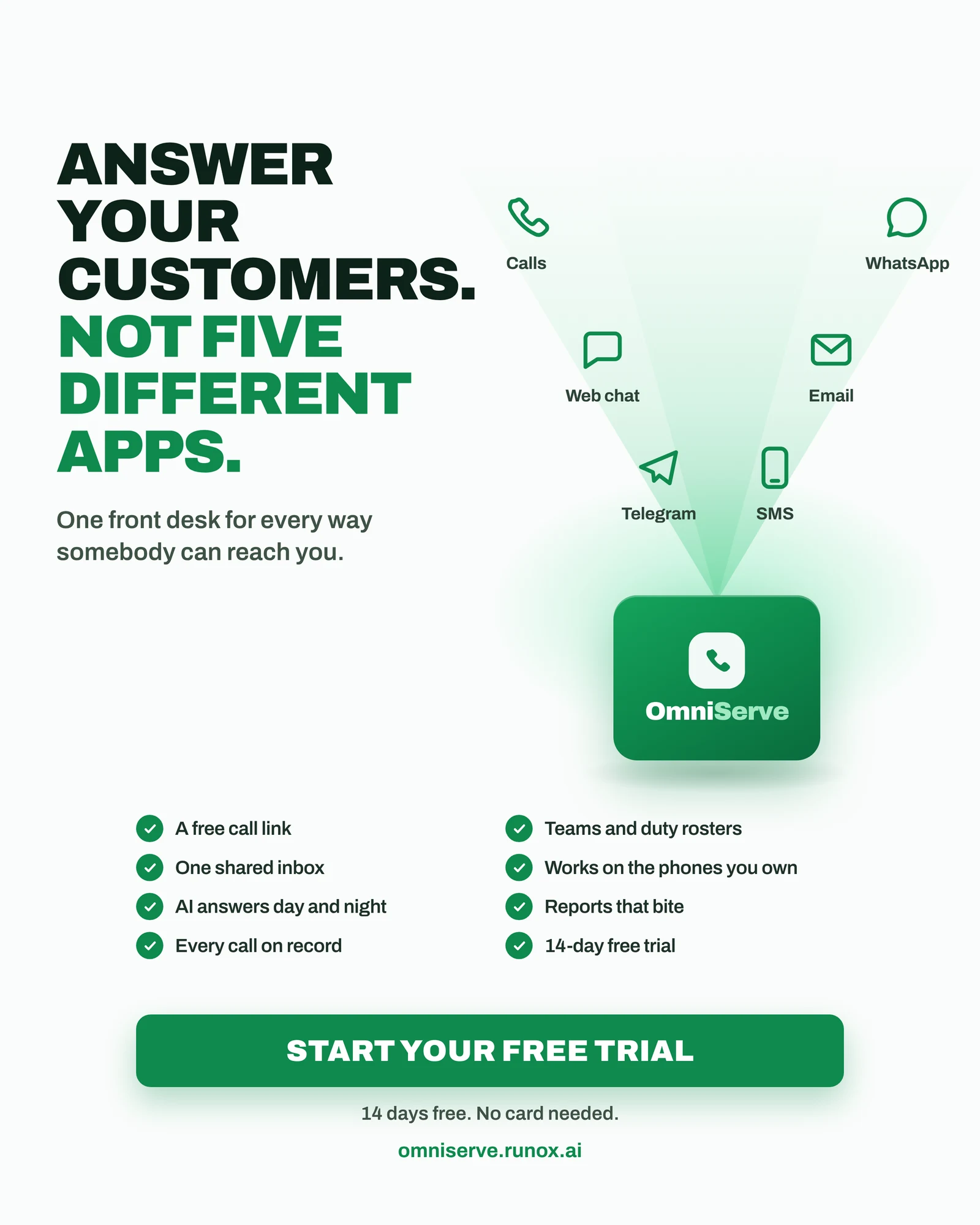 Figure 2: One front desk for every way somebody can reach you. Of the six channels shown, SMS is in testing as at October 2026; the other five are live.
The cost of five apps is not the subscriptions. It is attention. Every app someone has to check is a place a message can wait unseen. Staff learn which apps matter and which can be ignored, and customers who happen to choose the ignored channel get a slower answer for no reason they can see.
Two items on the checklist need a qualification. “Every call on record” is true in the sense that every call is logged in the inbox; call recording itself is an add-on you switch on, and it is off by default. And the 14-day free trial gives a new company every feature for 14 days, with no card needed to start.
What actually changes
When businesses move to a single inbox, five things change. None of them is dramatic on its own. Together they change how the business feels to a customer.
1. Nothing waits unseen
The first change is that every conversation is visible to the people who need to see it, not just the person whose phone it arrived on. If someone is ill, on leave or busy, the message is still there for whoever is on duty.
2. The work is sorted, not just listed
A good inbox does not show messages in the order they arrived. It shows them sorted by who needs a person. Conversations the AI has dealt with move out of the way. Conversations that need a human rise to the top. Staff stop scrolling through things that are already done to find the one customer who is actually waiting.
3. One customer is one customer
When the same person rings, then sends a WhatsApp, then emails, a single inbox can tie those together so the person picking up sees the history. This is covered in more depth in our article on the conversation record and the customer record, but the short version is that a returning customer should never have to start from the beginning.
4. Work is shared fairly
With five apps, work goes to whoever checks most often. That is usually your most conscientious person, who ends up doing far more than their share. With one inbox, conversations can be assigned to whoever is on duty, in turn, within the right department.
5. The conversations belong to the business
When somebody resigns, their conversations do not leave with them. This is the change owners tend to notice last and value most.
The operations view
The third figure shows what a full single-inbox platform looks like across the whole operation: six screens, each with what you see and what changes.
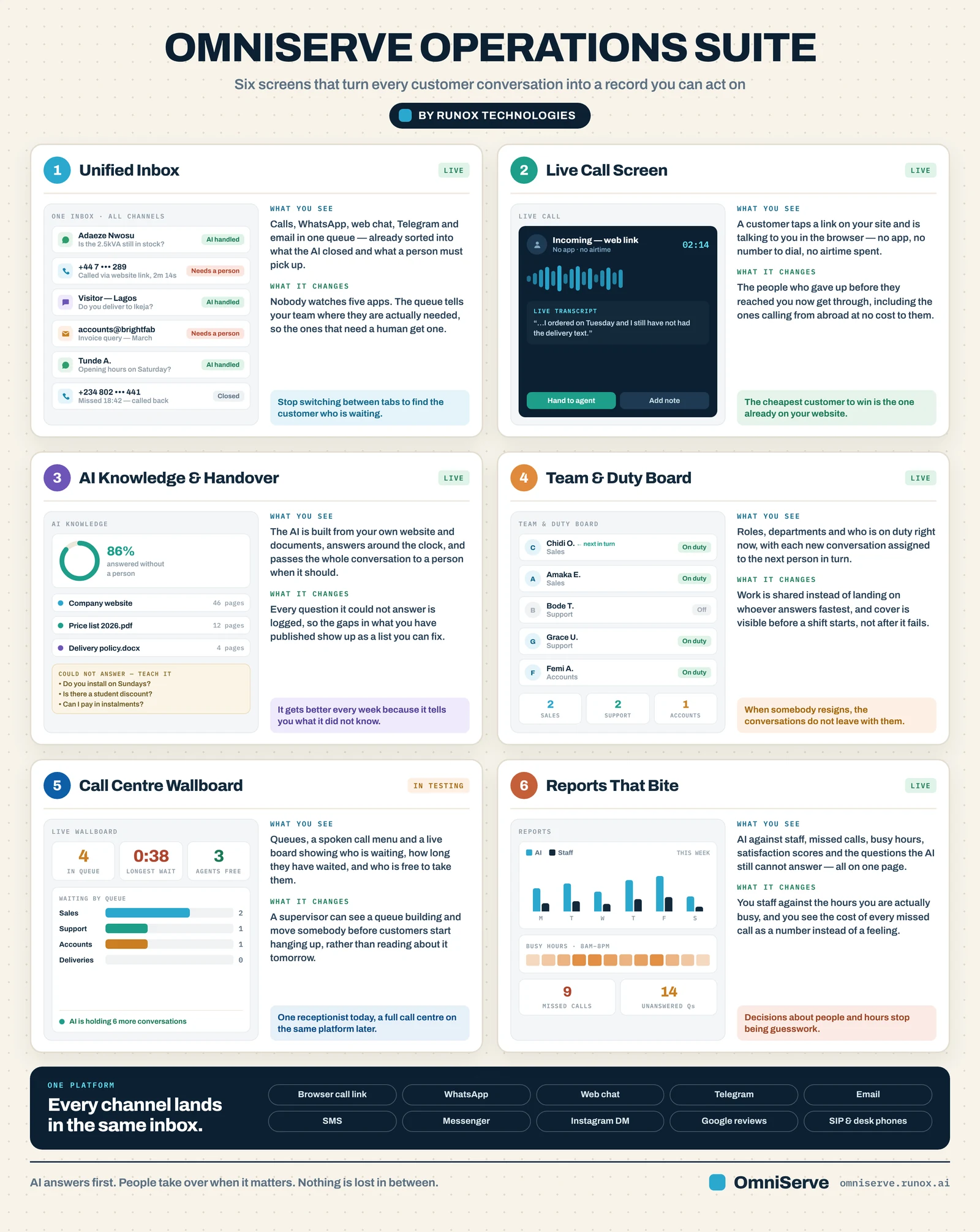 Figure 3: Six screens. The status labels in the top corners are the thing to read first: five say live, and the wallboard says in testing.
Go through it panel by panel.
Unified inbox (live). Calls, WhatsApp, web chat, Telegram and email in one queue, already sorted into what the AI closed and what a person must pick up. “Nobody watches five apps.”
Live call screen (live). A customer taps a link on your website and is talking to you in the browser: no app, no number to dial, no airtime spent. The point in the panel is worth repeating: the cheapest customer to win is the one already on your website.
AI knowledge and handover (live). The AI is built from your own website and documents and passes the whole conversation to a person when it should. Every question it could not answer is logged, so the gaps in what you have published become a list you can fix.
Team and duty board (live). Roles, departments and who is on duty right now, with new conversations assigned to the next person in turn. “When somebody resigns, the conversations do not leave with them.”
Call centre wallboard (in testing). Queues, a spoken call menu and a live board showing who is waiting and for how long. This is built but not yet live, and the figure labels it so.
Reports (live). AI against staff, missed calls, busy hours, satisfaction scores and the questions the AI still cannot answer, on one page.
The figures shown inside each panel (86% answered without a person, 9 missed calls and so on) are example screens, not results.
One correction to the channel bar at the bottom. As at October 2026, browser call links, WhatsApp, web chat, Telegram, email, and SIP and desk phones are live. SMS is in testing. Facebook Messenger and Instagram direct messages are built and waiting for Meta’s approval before they can be switched on. Reading and replying to Google reviews in the inbox is coming and waiting for Google; asking customers for a Google review after a good conversation is live.
The inbox in your pocket
A single inbox is only useful if people can reach it where they are. For many small businesses, that means on a phone.
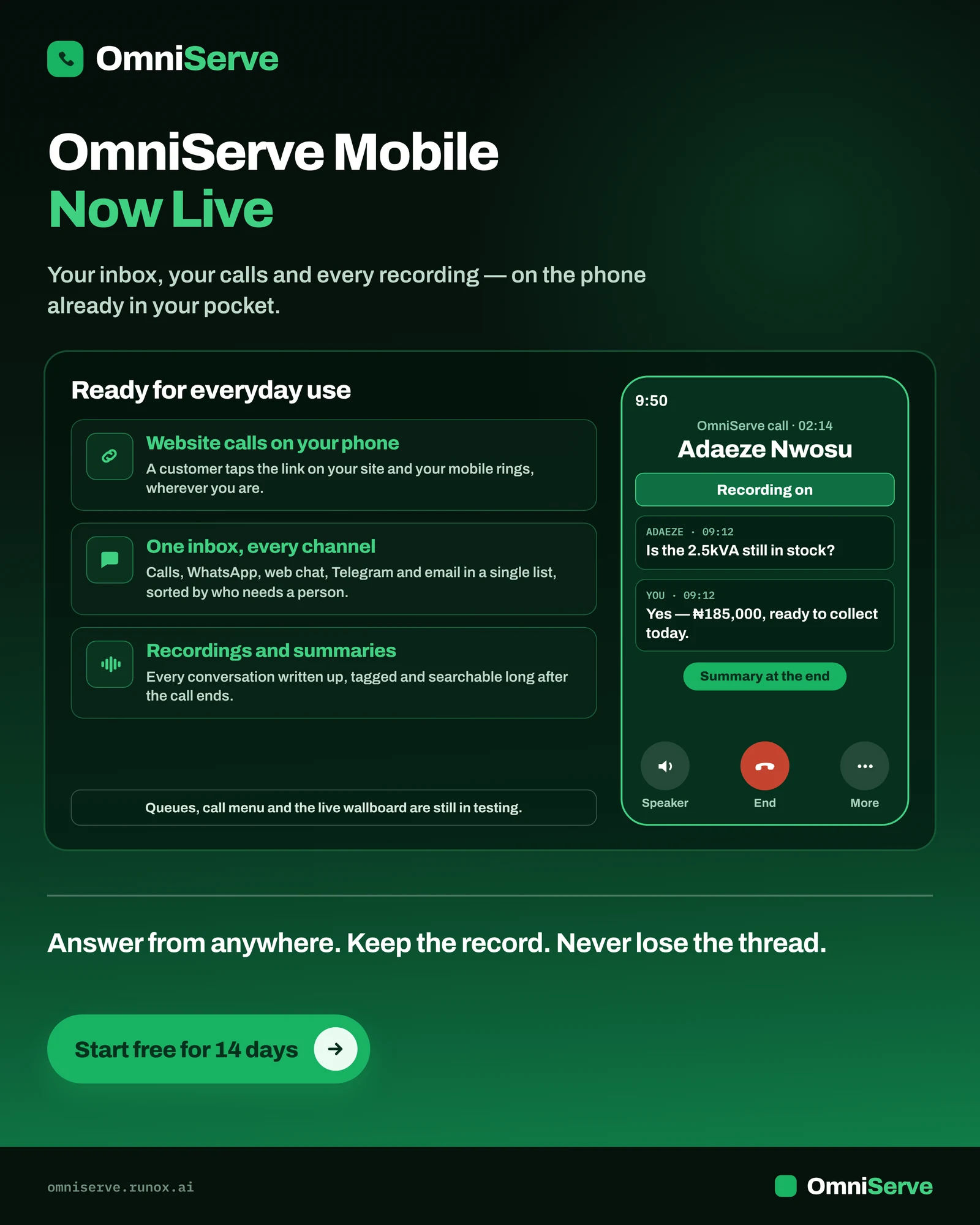 Figure 4: The phone app. Notice the small print in the left panel: queues, call menu and the live wallboard are still in testing.
The three things on the left are the substance. A customer taps the call link on your website and your mobile rings, wherever you are. The inbox on the phone is the same list as on the desk: calls, WhatsApp, web chat, Telegram and email, sorted by who needs a person. And conversations are written up with a summary at the end.
On the phone screen on the right, “Recording on” appears because recording has been switched on for that business; it is an add-on and off by default. The exchange shown is an example.
What this changes for an owner is the choice between being reachable and being at the desk. You can answer the conversation that needs you from a market stall, a site visit or a school run, and the record is written the same way as if you were in the office. There is also a desktop app for Windows and Mac.
Everything in one platform
The last figure is the owner’s view: one home screen with the week’s conversations, when customers call, and who answered.
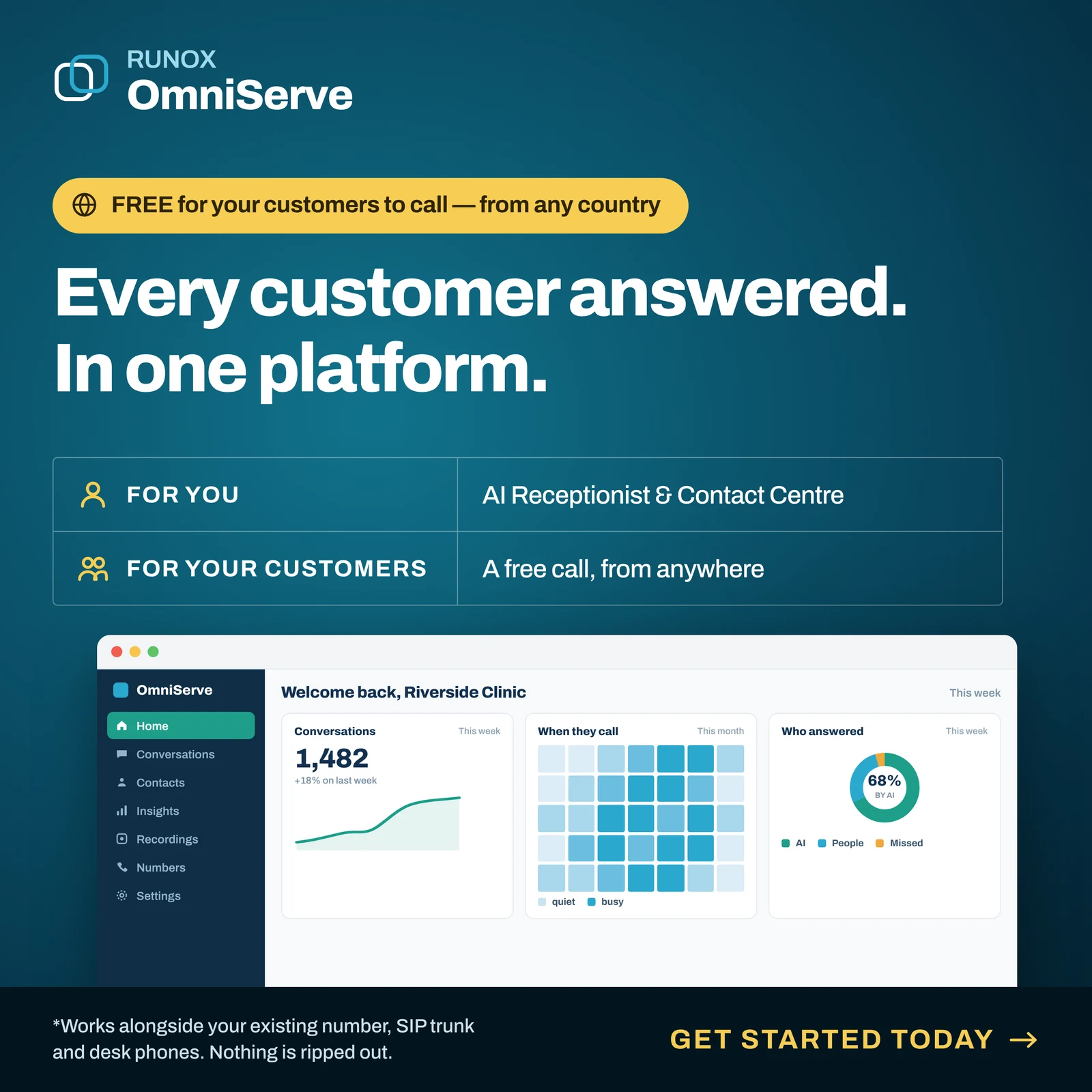 Figure 5: The home screen. The dashboard figures are an example screen, not customer results.
Three panels, three questions an owner should be able to answer every Monday. How many conversations did we have? When do people contact us? And who answered: the AI, a person, or nobody? The orange slice of that last chart, missed contacts, is the one to watch. In most businesses using five apps, nobody can draw that slice at all.
The footnote says the platform works alongside your existing number, SIP trunk and desk phones. “Nothing is ripped out” is the right way to think about the move.
“Free for your customers to call from any country” refers to the call link: the customer calls from the browser over their internet connection, so there is no number to dial and no international call charge to them.
What a single inbox does not fix
It is worth being plain about the limits.
It does not decide who is allowed to promise what. A single inbox makes it easier to see conversations. It does not tell your staff what refund they may offer. That needs written rules, which our article on the AI, the person on duty and the owner covers.
It does not answer questions you have never written down. If your prices, delivery areas and policies exist only in people’s heads, neither an AI nor a new member of staff can answer from them. The log of unanswered questions helps, but someone has to write the answers.
It does not replace a roster. If nobody is on duty at 7pm, conversations that need a person will wait until morning. The inbox will show you that clearly. It will not fix it.
It does not fix bad habits automatically. If staff keep answering customers from their personal WhatsApp, the inbox cannot see those conversations. The move needs a clear instruction, and it needs to be easier to answer from the inbox than from a personal phone.
A worked example (hypothetical)
A beauty salon with two branches and nine staff takes bookings by phone, WhatsApp, Instagram and walk-in. The business is invented.
Before: each branch has its own phone. Bookings over WhatsApp go to the owner’s number and one senior stylist’s number. Instagram messages are answered when someone has a moment. A customer who messaged on WhatsApp to move an appointment and then rang the other branch was double-booked.
After moving to one inbox: both branch phones, WhatsApp and the website chat land in one list, sorted by who needs a person. The AI answers price and opening-hours questions and books free slots from the calendar. Front-desk staff at each branch are on duty in shifts and receive conversations in turn. The owner reads the Monday report: how many contacts, when, and how many went unanswered.
Instagram is the one channel the salon cannot yet bring in, because Instagram direct messages in OmniServe are waiting for Meta’s approval. So for now, one named person checks Instagram twice a day and moves bookings into the inbox by hand. The salon writes that down as a known gap rather than pretending it is solved.
Do this this week
- List every place customer contact arrives. Include personal phones, paper and the list of missed calls. Count them.
- For each one, name an owner. Who checks it, how often, and who covers when they are away? Any channel without an owner is where customers wait.
- Count last week’s contacts by channel. Even a rough count tells you which channels matter most.
- Find the unanswered ones. Missed calls, messages with no reply, emails left unread. This is your baseline.
- Decide the order to move channels. Start with the busiest channel and the one that most often goes unanswered.
- Tell staff in writing that customer conversations happen in the business’s inbox, not on personal phones, from a date you choose.
- Book a Monday review. Fifteen minutes: how many contacts, when, and who answered.
Where OmniServe fits
OmniServe puts calls, WhatsApp, web chat, Telegram and email in one inbox, sorted by who needs a person, with the AI answering first from your website and documents and handing over to whoever is on duty. It rings the desk phones, SIP lines and mobiles you already have, and it runs in the browser, a desktop app for Windows and Mac, and a phone app with notifications. A call link on your website lets customers call from the browser with no number to dial.
As at October 2026: SMS and the call centre features (queues, call menu, wallboard) are in testing; Facebook Messenger and Instagram direct messages are ready and waiting for Meta’s approval; Google reviews in the inbox are waiting for Google. The 14-day trial includes every feature and needs no card.
Answer every customer, on every channel. See how OmniServe runs your front desk: omniserve.runox.ai
Sources
- OmniServe, “What’s running today, and what isn’t yet”, October 2026. https://omniserve.runox.ai/site/status
- OmniServe, “Questions: the things people ask before they buy”, October 2026. https://omniserve.runox.ai/site/faq