Can your customers reach you at all? Phone numbers, call links and customers abroad
· 11 min read
Before anyone answers, a customer has to get through. Who pays for the call, where it fails, and a seven-point self-audit you can run this week.
Most conversations about customer service start at the moment somebody answers. That is the wrong place to start. Before anyone can be helped, they have to get through, and a surprising number of customers never do.
Here is a common mistake. A business prints its number on the website, the van and the invoices, and then judges its customer service by how polite the staff are on the calls that arrive. Nobody measures the calls that did not arrive: the person who rang at 6.40pm and got no answer, the customer in London who saw a Nigerian mobile number and decided not to pay international rates, the caller who tried a freephone number from abroad and heard nothing useful.
None of those people complain, because they never reached anyone to complain to. They simply buy elsewhere. This article is about that invisible layer: the routes into a business, who pays for each one, where each one breaks, and a short audit you can run this week to find out how many customers you are losing before a single word is spoken.
The three ways a customer can reach you
There are really only three routes into a business by voice or message. Each one has a different cost, and the cost does not always fall on the business.
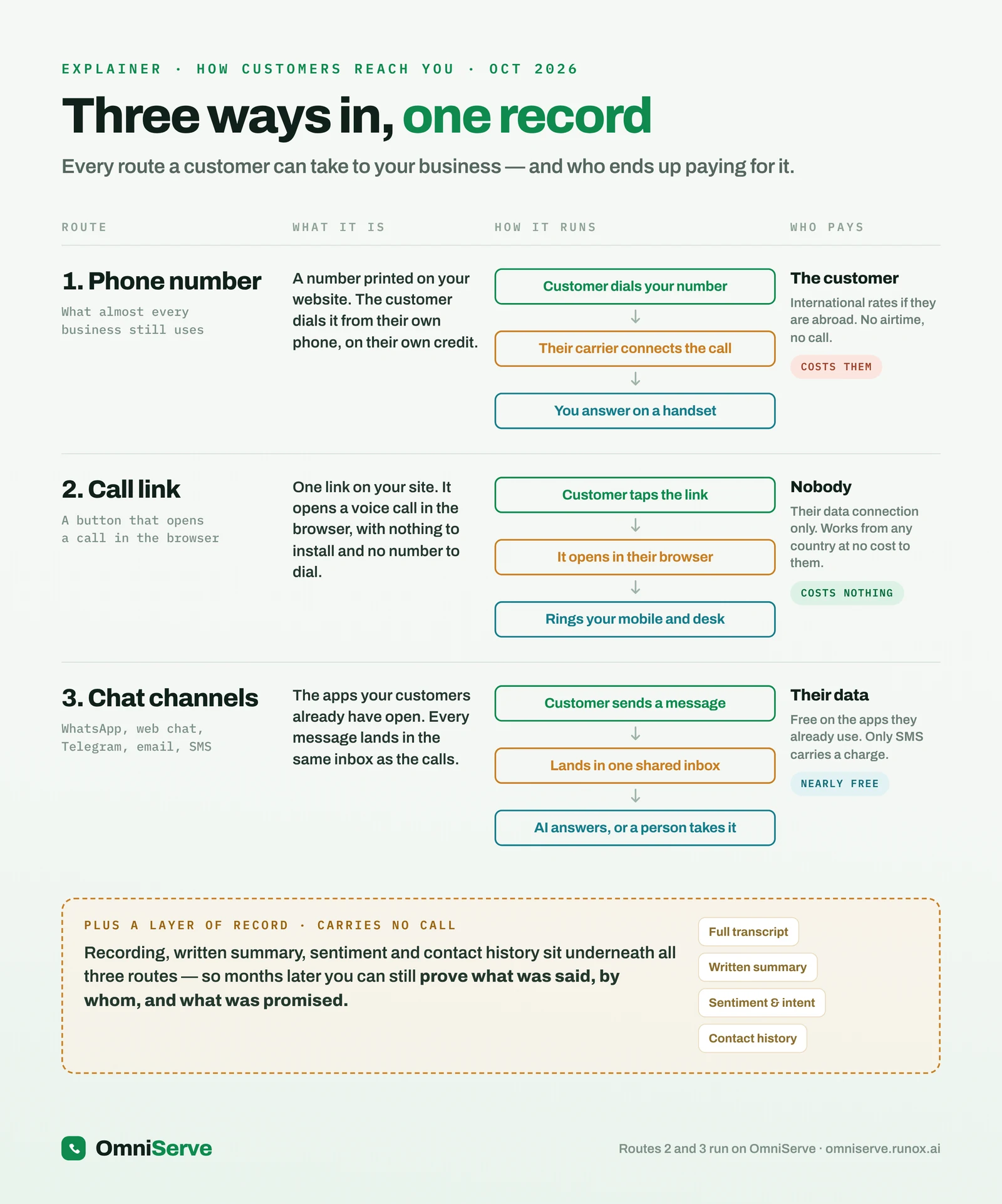 Figure 1: Three ways in, one record. Notice the right-hand column: with a phone number, the customer pays; with a call link, nobody does; with chat, the customer’s own data carries it.
Read the figure from left to right and then look at the last column, because that is where the hidden cost sits.
Route 1: the phone number. This is what almost every business still uses. The customer dials it from their own phone, on their own credit. Their carrier connects the call and you answer on a handset. It works well when the customer is in the same country, has airtime, and rings during your opening hours. Take away any one of those three conditions and the route starts to fail.
Route 2: the call link. A button on your website, or a link in an invoice, an email signature or a WhatsApp status, opens a voice call in the customer’s browser. Nothing is installed and there is no number to dial. The call travels over the customer’s data connection or Wi-Fi, so it works from any country without international rates. On the business side it rings your mobile and your desk phone.
Route 3: chat channels. WhatsApp, web chat, Telegram, email and SMS. These are the apps customers already have open. They are free or nearly free to the customer, because they use data, with SMS the exception. The risk with chat is not cost but fragmentation: if each channel lands in a different place, messages get missed.
The box at the bottom of the figure matters as much as the three routes. Underneath all three sits a layer of record: a transcript or written summary, contact history, and a recording where you choose to switch recording on. That layer carries no call of its own. It is what lets you prove, months later, what was said and by whom.
Calling a business: the brochure and the reality
If you ask a business owner how customers reach them, you usually get the brochure version: find the number, someone answers, sorted. It is a straight line.
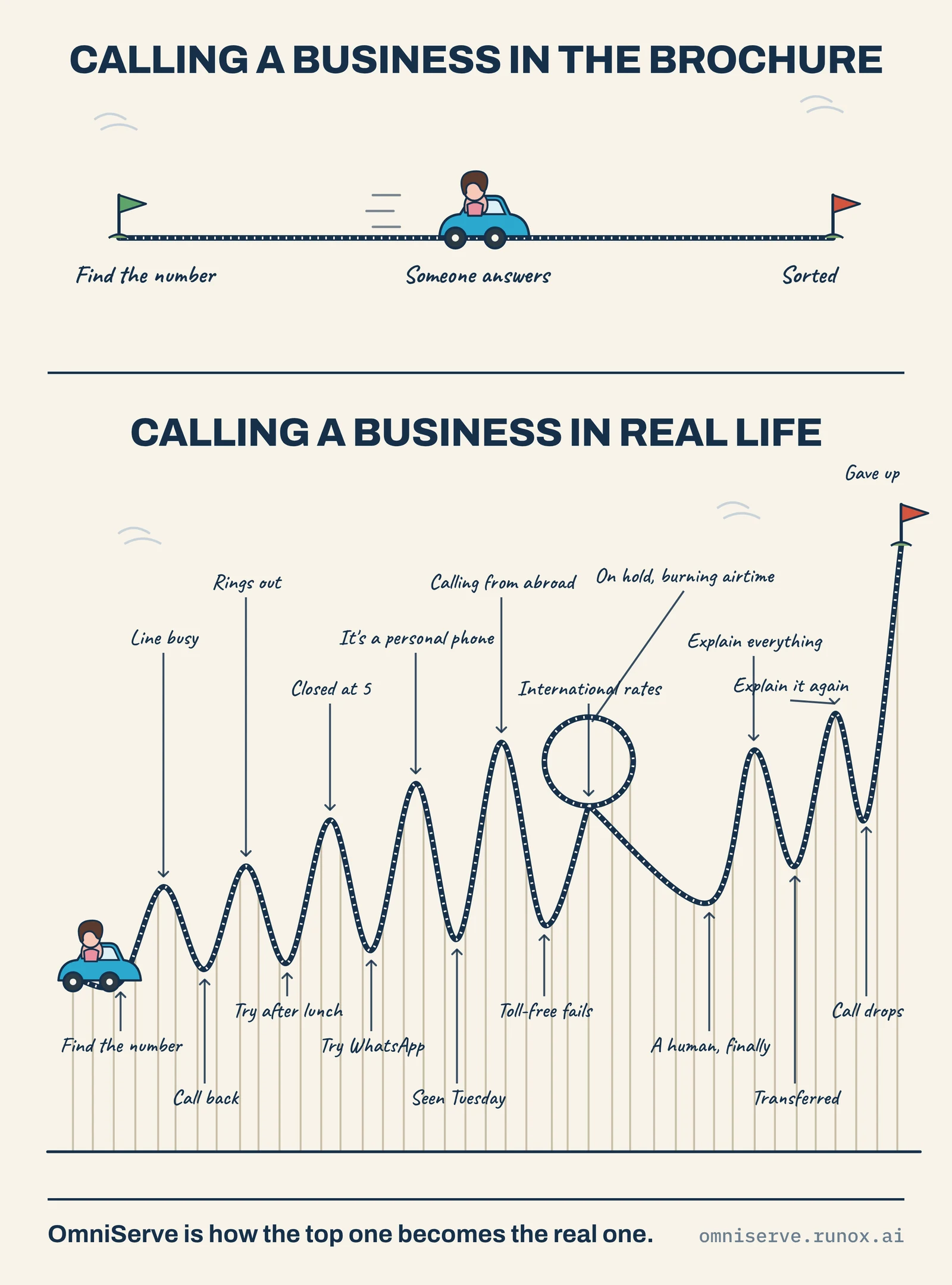 Figure 2: Calling a business in the brochure, and in real life. Count the points where the customer could give up before anyone helps them.
The lower half of Figure 2 is the version customers actually live through. Follow the track: the line is busy, so they call back. It rings out, so they try after lunch. They ring again and the business closed at five. They try WhatsApp and get a “seen” on Tuesday with no reply. It turns out the number is somebody’s personal phone. They are calling from abroad, so the toll-free number fails or costs them international rates. When a human finally answers, they explain everything, get transferred, explain it again, and the call drops.
Every peak on that track is a point at which a reasonable person gives up. The illustration ends with a flag marked “gave up”, and that is the honest ending for a large share of real calls.
What makes this expensive is that each failure is small and survivable on its own. A busy line is not a crisis. A missed call at 6pm is not a crisis. The damage comes from stacking them. A customer who hits three of these obstacles in a row does not conclude that your business is busy; they conclude that it is hard to deal with.
The customer abroad: a quick puzzle
Many businesses now serve customers who are not in the same country. A Lagos supplier sells to buyers in London. A UK college recruits students in Ghana. A church in Leeds has members who travel. An estate agent has overseas landlords. For all of them, the phone number on the website is a quiet barrier.
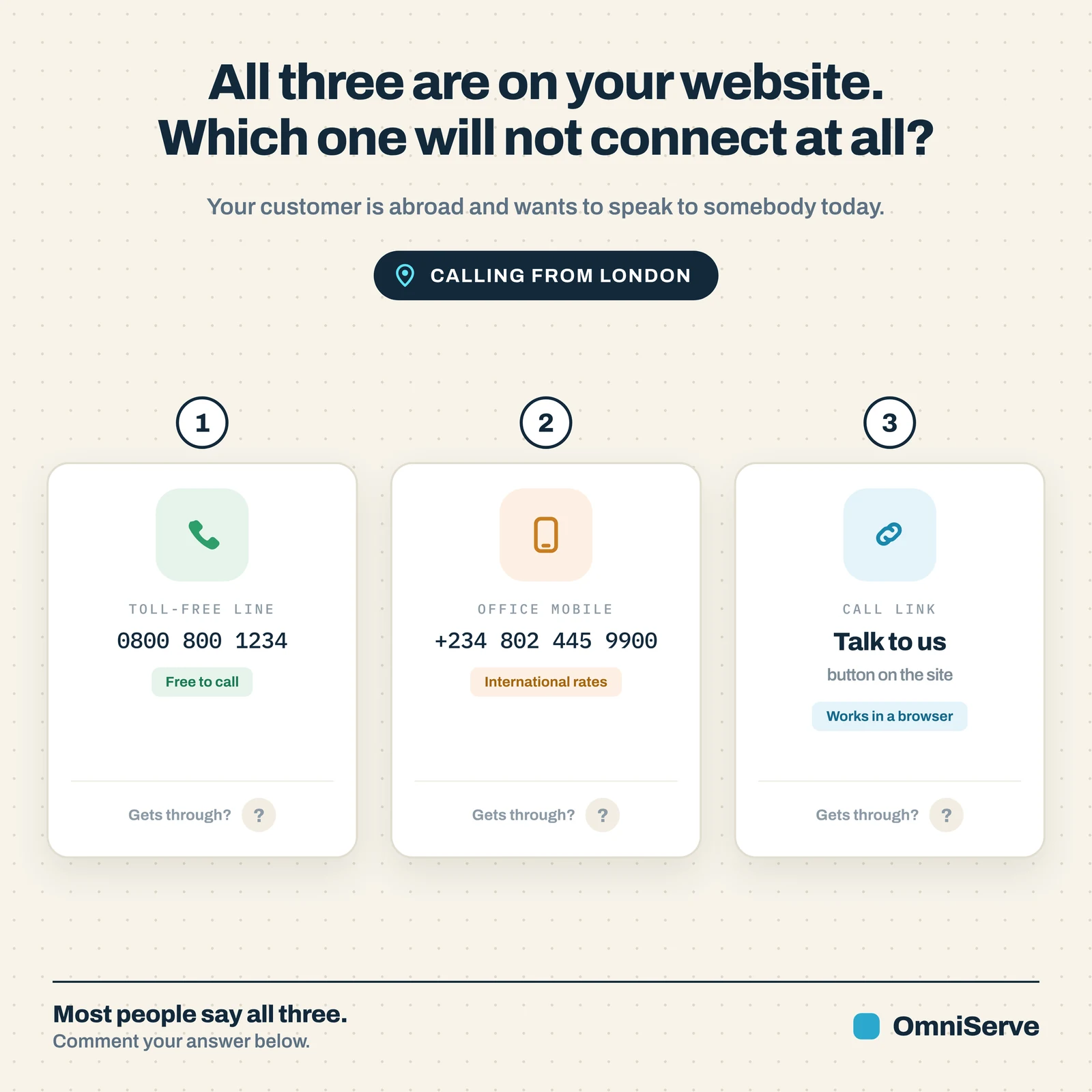 Figure 3: All three are on your website. Your customer is in London and wants to speak to somebody today. Which one will not connect at all?
Most people looking at Figure 3 say all three will work. It is worth slowing down on each.
The toll-free line. In the UK, Ofcom’s rules make Freephone numbers beginning 0800 and 0808 free to call from UK landlines and mobiles [1]. That protection is about calls made within the UK. A freephone number is set up and paid for by the business receiving the call, and whether a caller outside the country can reach it at all depends on how the number is configured and on the caller’s overseas network. Some freephone numbers are reachable from abroad and charged at international rates; others simply do not connect. The badge on your website says “free to call”, but for an overseas customer that may not be true, and it may not even be a call.
The office mobile. A number such as +234 802 445 9900 will usually connect from London, but the caller pays international rates. Some people will pay. Many will decide the question can wait, then forget, then find another supplier.
The call link. A “Talk to us” button opens a voice call in the browser. It uses the customer’s data connection, so there is no international rate, no number to dial, and nothing to install beyond allowing the microphone.
The honest answer to the puzzle is that you do not know until you test it. The practical lesson is that you should test it, from a foreign SIM or with a friend abroad, before assuming your overseas customers can reach you.
Why this matters more in 2026 and 2027
There is also a change in advertising that affects any business that runs search ads to generate calls. Google has announced that call-only ads are being retired. The option to create new call-only ads was removed in February 2026, and existing call-only ads stop receiving impressions in February 2027. Advertisers are being moved to call assets inside responsive search ads instead [2].
You do not need to understand the mechanics of Google Ads to see the implication. If a large part of your new business arrives by people tapping a phone number in an advert, the way that number is shown to them is changing. It is a good moment to ask whether a phone number is the only door you want to offer, especially to people on a laptop, where a number cannot easily be tapped at all.
A link that rings your phone
This is where the second route earns its place. A call link is an ordinary web address. It can sit anywhere a link can sit: on your website, in an email footer, in an invoice, printed as a QR code on a shop window, or on a WhatsApp status.
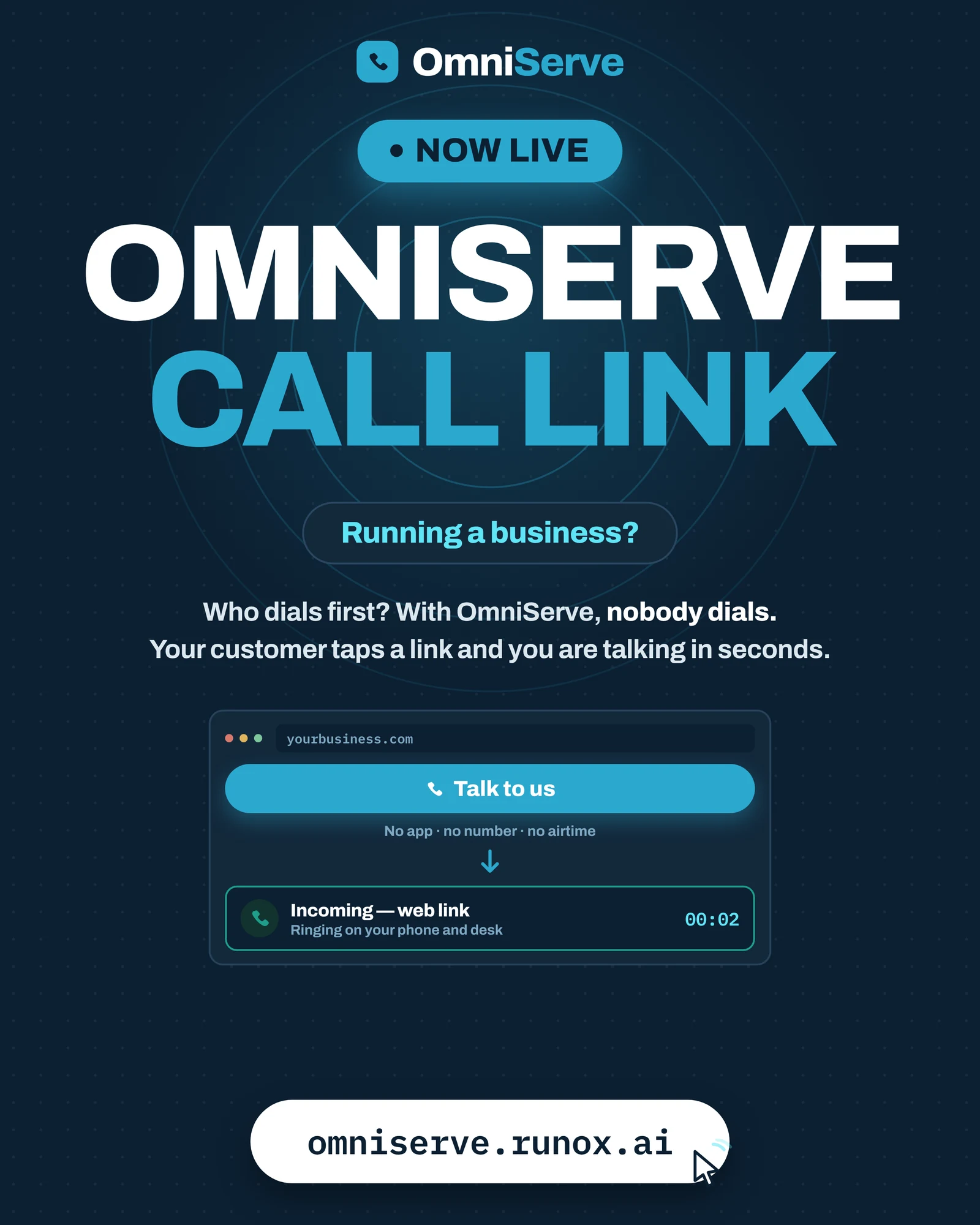 Figure 4: The call link. The customer taps one button in the browser; the business sees an incoming call within seconds, ringing on its phone and desk.
Figure 4 shows the whole idea in one picture. “Who dials first? Nobody dials.” The customer taps “Talk to us” on the website. Underneath, three short phrases set out what the customer avoids: no app, no number, no airtime. On the business side, an incoming call labelled “web link” rings on the phone and the desk.
Three details are worth noticing.
First, the cost falls on nobody in particular. The customer uses data they already have. The business is not paying a carrier to rent a number for that leg of the call.
Second, it works on a laptop. A phone number on a desktop website is something the customer must copy, find their phone, and dial. A link is one click.
Third, it is the same call wherever the customer is. A buyer in Manchester and a buyer in Abuja tap the same button.
Where it still goes wrong
A call link solves reachability. It does not, on its own, solve everything else on the rollercoaster in Figure 2. If the link rings a phone that nobody answers at 6.40pm, the customer is still stuck, just at a different point. That is why a link is usually paired with something that picks up when your team cannot, whether that is a colleague on duty or an AI receptionist that answers from your own website and documents and hands over to a person when it should.
There is one more practical limit to be aware of. A browser call needs microphone permission. Most people grant it without thinking, but some will hesitate. Offering chat on the same link gives those customers another way in, rather than a dead end.
The missed-customer checklist
Owners often know, vaguely, that they lose some customers. What they rarely have is a list of where. A useful way to find out is to run a short audit of your own front door.
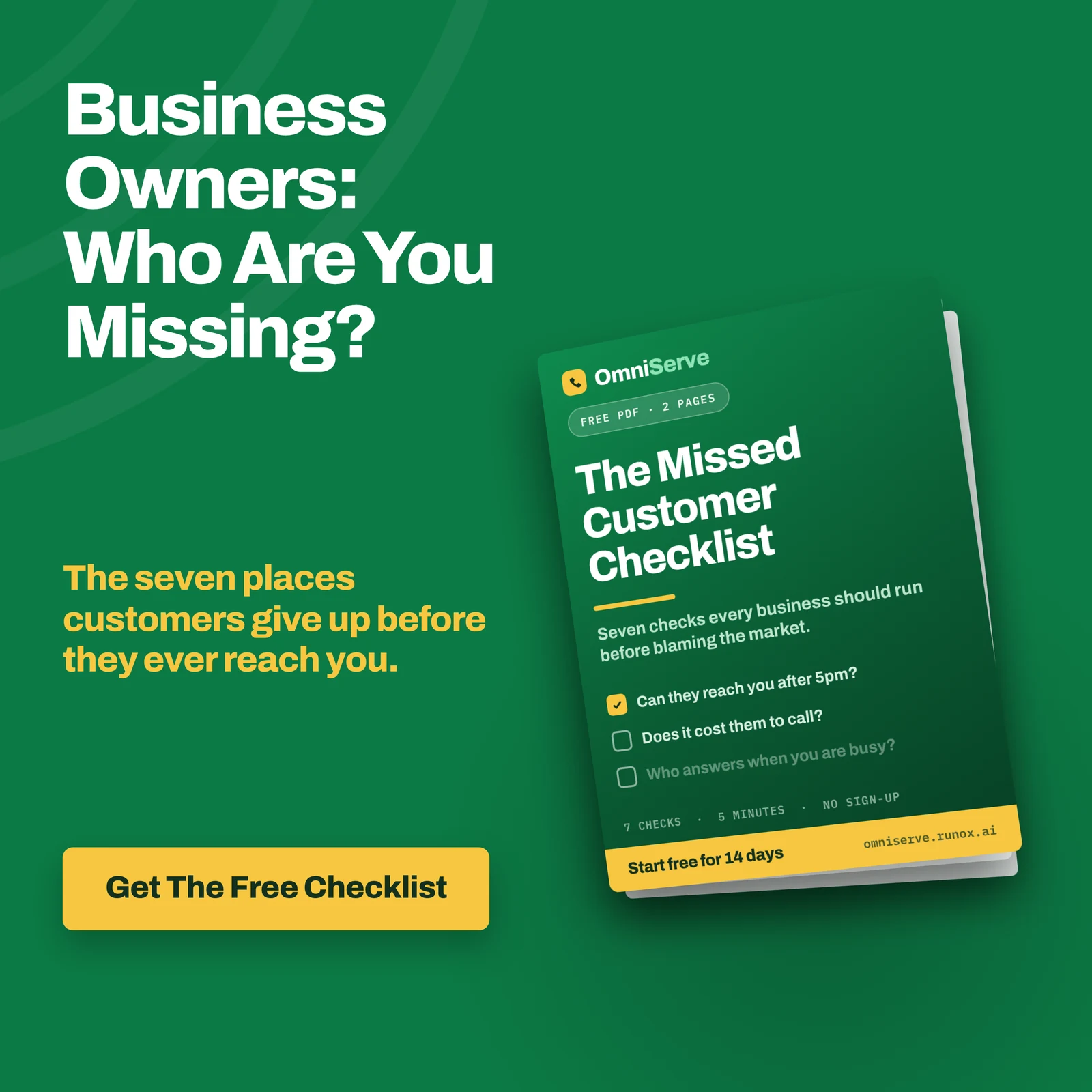 Figure 5: The Missed Customer Checklist. Seven checks to run before blaming the market for a quiet month.
The booklet in Figure 5 asks three of its questions on the cover: can they reach you after 5pm, does it cost them to call, and who answers when you are busy. Here is a fuller seven-point version you can run yourself, with no software.
- Can they reach you after 5pm? Ring your own business number at 6.30pm on a weekday and at 11am on a Sunday. Write down exactly what happens: ringing out, voicemail, a message, or nothing.
- Does it cost them to call? List every number on your website, invoices and adverts. Next to each one, note who pays for a call from inside the country and from abroad.
- Who answers when you are busy? Ring twice in a row while a colleague is already on a call. Does the second caller reach anyone, wait, or hear an engaged tone?
- Can a customer abroad get through? Ask a contact outside the country to try every route on your website and report back. This takes ten minutes and often surprises people.
- Is the number a person’s own phone? If customers ring a staff member’s mobile, ask what happens when that person is on leave, off sick or leaves the business.
- Do messages land in one place? Send a test WhatsApp, a web chat and an email. Time how long each takes to be noticed, and whether the same person sees all three.
- Is there a record? A week later, ask a colleague to find what was said on one of your test calls. If nobody can, a real dispute will be just as hard to settle.
Do not try to fix all seven at once. The point of the audit is to find the two or three that cost you most, and fix those first.
What to do this week
You can make real progress in a single week without buying anything.
- Monday: Run checks 1 and 3 above. Note every call that would have been lost.
- Tuesday: Run check 4 with a contact abroad. If your freephone number fails, take it off pages aimed at overseas customers, or add an alternative route next to it.
- Wednesday: Put your opening hours next to every number you publish, so callers at least know when to try.
- Thursday: Decide who owns the phone when the usual person is away. Write it down.
- Friday: Run check 6. If messages land in four places, decide which one person checks each, and when.
At the end of the week you will know which of the three routes in Figure 1 your customers actually use, where each fails, and roughly how often.
Where OmniServe fits
OmniServe is built around the second and third routes in Figure 1.
The call link is live today. A customer taps a link on your website, invoice or QR code and talks or chats from the browser, with no app, no number to dial and no airtime. Call-link calls can ring your mobile in the app and your desk phone, and the platform works alongside your existing SIP line and desk phones rather than replacing them.
WhatsApp, Telegram, web chat and email (from Gmail or Outlook) arrive in one inbox, sorted by which conversations need a person. SMS in the inbox is currently in testing.
If you want something to pick up when nobody can, the AI receptionist answers from your own website and documents, tells callers that it is an AI, and hands over to a person when it should. Call recording is an add-on you switch on; when it is on, callers hear that the call is recorded before anything else. Calls the AI answers are transcribed and summarised, so the layer of record in Figure 1 is there without anyone writing it up.
Call Link starts at ₦4,500, £9 or $9 a month as at October 2026, with a 14-day free trial and no card needed. The simplest test is the one from the audit: put a link on your site, ask somebody abroad to tap it, and see whether they get through.
Answer every customer, on every channel. See how OmniServe runs your front desk: omniserve.runox.ai
Sources
- Ofcom, “UK Calling” (Freephone 0800 and 0808 numbers free to call from all UK landlines and mobiles). https://www.ofcom.org.uk/phones-and-broadband/phone-numbers/uk-calling
- Google Ads Help, “Action Required: Transition from call ads to call assets”, announced 3 October 2025. https://support.google.com/google-ads/answer/16598240?hl=en